.jpeg "Home")
RP Blog
Customizing ResultsPlus in 5 Minutes or Less
We added a new video to our ResultsPlus channel on YouTube this week that I thought might be of interest to some folks. It's a quick video on the reasons why you might choose to add custom areas to ResultsPlus, including the actual creation of a custom table, setting up security for it, and creating a drop-down list for one of the fields. The whole video is less than 5 minutes, and if you've ever wondered about why to create or how to create custom tables, this video is right up your alley.
Would you like to see other videos? What topics (about ResultsPlus or fundraising in general) would you like to see covered in short-form? Let us know in the comments! Thanks!
It’s Always Good to Test the Water
Before you take the plunge and dive into your marketing messages, it’s always good to test the waters first. Nonprofit Times recently posted advice on their website from one of ResultsPlus’ product managers, Amanda Mallinger Reinartz, which describes the importance of testing fundraising marketing messages. The blog post also offers best practices on what to test, how to record your findings and ultimately, what to do with the results.
In the article “Testing Fundraising Marketing Messages,” Amanda shares that 37 percent of all e-marketers have admitted to not testing their email campaigns before launching them, which can lead to vulnerabilities in the effectiveness of the results. To avoid this, Amanda provides guidance on identifying your audience, testing resonance and engagement and finessing your message.
- How do you decide what to test? Direct marketers test envelopes vs. electronic mail, stamps vs. metering, labels vs. windows, etc. The list goes on to include aspects of emails such as subject lines, time of delivery and message wording. The key thing to remember is the goal is to identify which variation provides the best percentage of engagement.
- Delivery method also matters. Should it be direct mail, email, or a tweet? These are questions your fundraising software cannot directly answer, but testing your messages may help provide the answers.
- How do you record and report test results? Recording test results and subsequent analysis is where fundraising and donor management software can assist and benefit you. The key is to ensure you’ve identified the data necessary for analysis.
- You might also want to segment the appeals with specific codes, test group “A” has appeal “X”, and so forth. Use your CRM software’s built-in tools and reports to inform and guide your efforts. Then, review the reports already available in the system for campaign and appeal analysis. Use the winning test as part of your message to your target group.
Thanksgiving
We, at Metafile, wish each of you a wonderful Thanksgiving filled with family and friends. Know that we are humbled to have customers like you, who spend all year working towards making the world a place for which we can all be even more thankful.
Follow Import Laws to Avoid Trouble
If you’ve never done it, importing data into a database can be an intimidating task. But if you plan your work ahead of time and follow a few basic rules, it can be a huge time-saver and an important way to keep your database current and clean.
So here are a few import ‘laws’ you should build into your procedures right from the start:
- Always, always have a recent and valid database backup in place before you begin any import. There is no better insurance against missing or overwritten data than your ability to restore a backup and return to square one.
- Make sure that a unique ID number is part of the source data and then include it in the data you import. Find a designated field to store this number in and use it to maintain an ongoing connection between the destination (your donor management system) and the source
For example, if you’re importing recent graduates from your admissions software into ResultsPlus, make sure to include their student identification number from the original program. Store the Student ID as part of the new ResultsPlus record to make updates in the future. ResultsPlus offers three fields to hold just this type of data: Key1, Key2, and ReferenceKey. - Before importing data into a given field, make sure it is ready and available to accept the data you will be placing there. Your imported data will overwrite any existing data, so make sure the fields are empty. A simple query should do the trick: Table.FieldName Is Not Null. This will find any records that already have data in that field.
- Make sure that the data you are importing is mapped to a field formatted to hold that type of data. In other words, don’t import gift values into a field formatted to hold dates or you will get unexpected results.
- If you’re updating existing constituent records, make sure to include the unique ID numbers in your query when you originally qualify and export the data. Think of it like the return address on a letter you send - it will help you get the data ‘back home’ after it’s been updated.
This is particularly important with addresses, since ResultsPlus allows multiple addresses for constituents. Make sure you qualify all addresses (not just the primary ones) and that you export both the FolderID and the AddressID with the constituent names. - Before performing your full import, run a test import with just a few sample records. Consider it a dress rehearsal to help you get a feel for the import process without making significant changes to your database. Use a sample size that is no larger than necessary - limit to the number of records you can manually fix if necessary. It can also help to flush out problems with your source data and import template prior to importing the entire file of data.
If importing data feels like more than you want to tackle, remember also that you can purchase custom import services from ResultsPlus. Our data services professionals can complete imports in just a few hours, which could be hours you spend serving constituents or talking to major donors. Call the support line (800-222-4096) or send email to [email protected] for more information.
Troubleshooting “Missing” Donations
I’ve recently spent time working with our Support team to help them work with customers to troubleshoot “missing” donations. As more and more data entry is automated, when something suddenly doesn’t work, it can be more difficult to figure out what went wrong and where the data is. Here are a few tips to help you troubleshoot the various ways a donation can go “missing.”
The first step is to define what you mean by “missing.” Once you’ve defined the context for the missing donation, you can begin taking steps to find the donation.
- Was the donation posted to the donor’s record, but now you cannot find it?
- Did you receive a notice that an online donation was made, but the donation hasn’t automatically appeared in your database?
- Do you believe you should have a donation based on viewing your Moneris reports?
- Do you have another process that automatically imports donations on a schedule? Are those the donations that seem to be missing?
- Write a query to view all donations that came in on or around the time your missing donation was expected. Double-check to see if it is in the list, and you just missed it when reviewing via another method.
If the donation was posted to the donor’s record, but now you can’t find it:
- Can you find the donor’s record? If not, it may have been merged into another record. Look for that record; you will find the donation there.
- Double check whether or not anyone deleted it. CTRL+Shift+A will bring up the change audits screen in ResultsPlus 11. Run the audit report for changes in gift. If you find that it was deleted, you may want to consider changing a number of security settings and processes at your organization to prevent this from occurring in the future.
- Disallow editing gifts after they’ve been posted for every user.
- Update your policies and procedures manual to include steps for entering credit memos in correction scenarios for gifts.
If you received notice that an online donation was made, but it hasn’t already appeared in your database:
- Double -check with whoever has been designated as the recipient of any notices sent by the ResultsPlus Gift Polling Service. It’s likely this person received an email notifying him or her that there is a problem. Review the problem and take appropriate action. For example, if the error indicates that the Campaign code in the donation isn’t active, double-check your online giving site to see which campaigns are allowed and re-activate any inactive campaign codes in ResultsPlus that are also available via the website. Once the gift has arrived, you may need to eliminate this code option from your website, if it is truly supposed to be inactive.
- Check the ResultsPlus Gift Polling Service error.log file located on the server. Is there an error there? If so, take the appropriate steps to correct the error.
- Is the ResultsPlus Gift Polling service running? If not, restart it on the server.
If you are finding donations in your Moneris reports that are leaving you confused:
- Don’t forget that not all donations in the Moneris report were made via your website. You could have also entered them directly into your ResultsPlus system and processed them from there. Look for those donations the same way you would any other donation that is already in ResultsPlus. Here’s a tip:
- One-time donations made online have receipts on the Moneris site that begin with your ResultsPlus Online site initials (account name).
- Recurring donations made online have receipts on the Moneris servers that begin with the last name of the donor.
- Donations made from within the ResultsPlus application have receipts on the Moneris website that begin with your Moneris StoreID.
These differences are designed to enable identifying which vehicle was used to process the card (or ACH transaction). They can be helpful when troubleshooting.
The missing donations come in from some other automated process:
- Confirm the other process ran.
- Check the ResultsPlus import.log file to see if the import encountered any errors during an import process.
DIY Training: Take Advantage of Existing Resources

If you’re lucky, things run pretty smoothly in your development office. Each of your staff has their unique area of responsibility and interacts seamlessly with other internal experts. If your luck holds out, this state of equilibrium will continue for a very long time.
If (or perhaps more accurately, when) your luck runs out, then one day you’ll find that a key staff person (like the person who administers your donor management system) has announced they have taken a position with another company or are retiring. They have years of information about donors and gifts, processes and procedures stored neatly inside their head and it’s about to walk out of your building.
Suddenly your big puzzle has a missing piece. And you have a new priority to hire and train a new employee. Where do you begin?
The answer may depend on how much money you’ve set aside in your budget for staff training. If you’ve prepared for this scenario, then you can simply visit the training page of your software company’s website to learn more about what your options are. You may even be able to purchase a training session right on the spot.
But if you haven’t the financial resources to purchase training services for your new employee, consider what you might already have at your fingertips. In the good old days when software came with manuals, you could just dig them up (hopefully) and start reading. Now, software is designed with the help system built right into the product. That means that there is likely a digital version of the old-fashioned manuals waiting to be explored whenever you’re ready. If you haven’t found it yet and you’re using a Windows-based application, look for either of these two fairly-universal tools for Windows-based software applications:

There may be even more ways to get a jump start on training a new employee on a shoestring. Consider the following possible resources:
- If a previous employee was trained on the software, are there training materials that can be reviewed or used for a self-study exercise?
- Is there a forum or user’s group available in your community where you might begin to learn from other more-experienced users of the application?
- Are there materials that came with the original software purchase that may be helpful? A quick-start or new-user guide could prove to be your new best friend.
- Does the software company offer demonstrations or online webinars that might provide you with a helpful overview? If so, sign up for anything you can.
This blog is a great place for experienced ResultsPlus users to offer advice to new users. In the spirit of mentorship, we invite you to share what you found most helpful when you first got started with ResultsPlus.
Where’s Waldo?
This week’s blog post is short and sweet…And it comes with a picture. To celebrate October, we thought we’d share a picture of the ResultsPlus Support and Development team. You have probably spoken to some of us on the phone or via email more than once!

Integrated Communications
An email went by recently from Idealware. The message touted A Practical Guide to Integrated Communications: A Workbook for Nonprofits. Interest piqued, I downloaded this free guide. It is excellent. I highly recommend any organization that communicates with constituents via multiple channels (Facebook, website, twitter, email, for example) download and use this guide. It is clearly written, and it contains worksheets to help you identify who is responsible for communicating what at your organization. It then guides you through setting up strategic, consistent (but not necessary exactly the same) messages and building a timeline for those messages.
The Running Man
If you’re a fundraising professional, I suspect you might have the same pile of magazines and newspapers building up on your shelf that I do. You know them - the magazines and newspapers, whitepapers and shared articles that people have passed on to you because you’re next in line on the literary trail. If you’re like me, you have great plans to go through those while you’re eating lunch at your desk one day. Then months go by and the pile has not moved or changed, except for an increase in height.
Well I finally did get to that pile this week and it reminded me of why I don’t just pass them on without reading them. There in the middle of the March 2013 issue of Fundraising Success was an article written by one of the most phenomenal people I’ve met in my life so far. His name is Bryce Gaudian, and I met him at an AFP conference where he was representing his company in their booth at the expo. He was warm and pleasant at first handshake, but over time I came to realize that was only one of his lesser assets.
Never have I met a person who lives and breathes ‘good’ in such a natural way. He runs marathons to help his favorite charities, usually for underprivileged children. But he doesn’t do it alone - he brings you with him.
I don’t think Bryce ever actually thinks about doing good things, he just does them. I think it’s in his DNA and I know it’s in his heart. I’d like you to experience this truly unique and exceptional example of philanthropy, so I’m offering this link to the Fundraising Success article written by him. I hope you enjoy it and are inspired by it as much as I was.
Referral Program
Did you know that Metafile has a referral program for ResultsPlus? It may be one of the best kept secrets we have. And I’m here to remove the mystery!
During the course of your days, you probably talk with others who may be looking for software and wondering what you use. If you send them our way, let us know! If they choose ResultsPlus, we would be delighted to provide you either a 1 year subscription to ResultsPlus.tv (24/7 on demand training for everyone at your organization) or one hour of 1:1 online training (you choose the topic) for free. Choose which one is right for your organization!
If you would like to know more about the referral program or want us to know of someone you sent our way, email [email protected] or call your account manager at 800.638.2445.
Setting a Course for Success
We are pleased to announce that a new e-learning course has been added to the ResultsPlus.tv site. ‘CRM for Major Gift Development’ is a new six-session course that focuses on how ResultsPlus can help you manage the myriad of details involved with major donor cultivation.
The course is broken down into six sessions as follows:
- Introduction to Constituent Relationship Management (CRM)
- Setting Up ResultsPlus for CRM
- Stage 1: Identification
- Stage 2: Strategy
- Stage 3: Cultivation
- Stages 4 & 5: Solicitation & Stewardship
If you have a current ResultsPlus.tv subscription, you can access all of the sessions in the course simply by logging on to the site. For those of you who do not have an active subscription, we invite you to view the introductory session of the course free on our YouTube channel. If you like what you see and think you could benefit from the remaining sessions of the course, grab your company credit card and sign up now at ResultsPlus.tv.
As always, let us know your thoughts and ideas for this new course and any other courses you’d find beneficial.
Project Management
I’m giddy right now. How often does a software developer use the word giddy? (Answer: about once every 2-3 years! Ha!)
Development is nearing the end of a long cycle. We have spent years working on a new foundation for managing projects that involve various fundraising events/functions. In the coming weeks, you’ll hear more about this exciting new set of features that will shift the way dinner galas, luncheons, auctions, golf outings, etc. are managed within ResultsPlus. Our new project management functionality is not only fully integrated with ResultsPlus, it offers drillable timelines, the ever-present “thermometer”, and a host of automated processes (like zipping up collateral to send to publishers) and data entry flows that will streamline the way organizations manage the functions associated with these types of large projects.
Project Management: In Real Life
In my non-professional life, I’m currently chairing a fundraising committee. The fundraising we are doing is funding a literacy initiative for local area first graders. Part of the fundraising effort involves, you guessed it, a special event. Because you, as nonprofit professionals, experience what it is to manage a project like this as part of your daily lives, I wanted to say “Wow!” I’m only doing this as a very limited gig, and I cannot imagine the necessary organizational skills, enthusiasm, and energy it must take to do this full-time. In the spirit of sharing, here are a few things I’ve learned during my time chairing the committee. These things are universal, and I’ve no doubt those of you with experience have already learned them many times over!
- Getting organizational buy-in for the project is very important. We’ve been lucky; our organization is very excited about both the literacy initiative and the event. The committee heading the initiative did a wonderful job of presenting it. Once buy-in was there for the literacy initiative, the fundraising committee was formed, and we then presented the event idea. The buy-in is so exceptional that it leads to lesson 2.
- When keeping people in the loop, be very careful about what you are ready to go public with and what is still in draft. I made a huge mistake when sharing an update to the board of the organization. My intent was just an internal update, but members of the board started running with it! I now know I should have been much clearer when I provided the update that the information was not yet ready for public distribution. Our committee hadn’t yet confirmed agreements for space, finalized positioning, and a number of other things. But this exposure did get us to hurry-it-up! (smiley face) All that aside, a board with that much excitement and desire to back our efforts is wonderful! We’ve got members already asking when they can start selling tickets!
- Play well with others. Our event is taking place the same day as another event, and they are happening at adjacent locations. We’ve been working with the organizers of the other event to promote cross-traffic with the goal of improving attendance and response to both events. Why compete when we can work together instead?
- Appreciate your committee members. I’ve worked with the people who make up the fundraising committee in the past, because we are all members of the same organization, but I’m amazed all over again at what a small group of dedicated, capable people can accomplish. Putting together a small group of go-getters produces incredible results. I hope each and every one of you has members and volunteers like this at your organization.
My hope for all nonprofit professionals, especially those who spend so much time managing projects that culminate in events, is that you have the great experiences I’m now having. My hat’s off to those of you who do this all day, every day!
Learning from the Learners
This week we are in the midst of a three-day session of the ResultsPlus Essential Elements class here at our corporate headquarters in Rochester MN. (We’re also in the midst of a serious heat wave, but thankfully most of the attendees are from the Midwest and are well-accustomed to this type of mood-swing in the weather.)
Meeting our customers as they come to learn about ResultsPlus is nothing new. But every once in a while you get this group of complete strangers that has amazing chemistry who are all excited to be here. And the enthusiasm is contagious! Okay, so maybe they truly are just thrilled to be away from the office for a few days, but I’m going to be optimistic go with ‘excited to be here.’
So thanks to the current class of ResultsPlus users for the chance to watch your discovery, hear your questions and ideas, and witness your passion for what you do.
Care to be in the next class? Check our website for the upcoming sessions.
YouTube Channel
Metafile has recently launched a YouTube channel for ResultsPlus. We have put a video on Solicitor Metrics on the channel for your viewing. Over the coming weeks and months, we’ll be uploading additional videos on industry topics. If there is a topic you’d like to see us cover, let us know!
Here’s the link to the new ResultsPlus Nonprofit CRM Fundraising channel, and if you wish, you can subscribe to it, as well.
Moves Management, ResultsPlus and You
An increasing number of inquiries are coming in about Moves Management and how software can help implement it. For organizations with a staff large enough for specialists, it is probably a familiar concept and term. For smaller and one-person development offices, it may be yet on the horizon.
The Moves Management concept was originally presented by David Dunlop, a senior development officer at Cornell University, as a way to break down the major donor cultivation process into specific, documentable stages. Since giving officers at large universities work with many different donors at various stages of a relationship, this was likely born of a need to better plan, budget, and be accountable for the resources of their major giving efforts.
For organizations new to major gift development, it also provided a roadmap to help understand and implement a program which would take them beyond the annual fund. It has proven to be a valuable tool for these groups, helping them shift from donation-focused fundraising to the donor-centric philosophy required in major giving.
If you’re one of the organizations moving toward a Moves Management-type process, you should know that ResultsPlus has included functionality to accommodate the process for several versions now. And the newest version provides even more features to help you implement and manage the process, with the addition of several reports and charts that can show your overall progress at a glance.
You’ll find some excellent information built into the help system in ResultsPlus that can help you get started. Check out the topic ‘Developing Major Donor Relationships’ in the table of contents on the How To tab. There you’ll find more specific information on:
- Implementing a Cultivation Strategy (a self-running tutorial)
- Understanding Cultivation Information
- Recording a Cultivation Strategy
- Identifying Key Players
- Assigning an Account Manager
- Scheduling Follow-Ups
By the way, you may notice that the ‘Moves’ term is not used specifically in ResultsPlus. We’ve chosen to use generic language for the actions that can help you document and manage relationships with all of your constituents.
We wish you great success with your major giving efforts and hope this information can help with your moves!
Query…Everyone’s Favorite Tool
Today I held a somewhat long conversation with…myself. It went something like this:
Query is one of the most powerful tools I have in my ResultsPlus toolbox. It’s my favorite thing to do in ResultsPlus. I can use it to analyze most any imaginable scenario, as long as I’ve got the data. With this kind of magical tool in everyone’s hands, how could it not be the hands-down favorite?
Ah, Self, let me count the ways for you…
- I don’t know where to find the information I want to analyze.
- I cannot ensure that the data is entered that I will later want to analyze.
- Ands and Ors are confusing.
- Parentheses: The bane of my existence.
Hmm…Self, you make some valid points. Let’s work through them.
- Did you know that the database fields are identified in the tooltips for the fields? If you know where the information “lives” on the screens, you can hover your mouse pointer over the label and the database field name will appear. If you prefer to see the fields in list form, you can print the fields from the ResultsPlus Help system.
- This one is tricky. At the start of any campaign, we probably identify how we want to analyze it later. Perhaps we can make certain fields required in ResultsPlus so we cannot accidentally forget to populate them. We can also set up default values in our Quick Entry forms for gift, pledge, membership, and adding new constituents. If the needs are more complex, we can talk with support about additional options. (OK, so maybe I didn’t have this whole conversation with myself, but the suggestions are still valid options! :-))
- Ands and Ors can definitely be confusing. This is because, in English, sometimes “and” actually means “or” (“I want everyone from Minnesota and Iowa included”), but in query languages that NEVER happens. Being aware of when this is likely to occur goes a long way toward clearing up the confusion.
- Ah, parentheses…think of them as the two arms of a hug. A hug you only need if you are working with both Ands and Ors in the same query. (After all, Ands and Ors are confusing, so a hug seems like it might be needed therapy!) Years ago, we had a trainer who had one of the best examples of how parentheses are used in “real life.” She used the example of ordering breakfast.
A person would get steak and eggs, country potatoes or hash browns, and toast or fruit. In this case, the commas work pretty well as parentheses. Let’s re-write the menu: Steak and eggs and (country potatoes or hashbrowns) and (toast or fruit)
If you still aren’t convinced the query is one of the best things ever, we also cover many aspects of query in the Help. Here is a snapshot of some query topics:
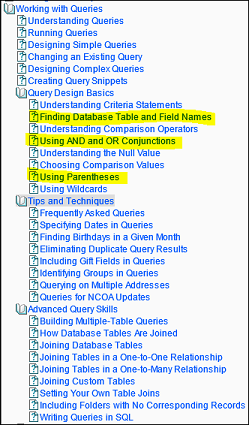
By the way, are some of you “beyond the basics,” but wanting more advanced query training? If so, let me know in the comments section of the blog. If we get enough interest, we’ll put together a webinar on advanced query topics!
Powerful Stuff
Having worked in the nonprofit sector for many years, I have definitely had my share of golf balls. Yes, you read that correctly, I said golf balls. I’m not talking about the freebies given away at a charity golf tournament, I’m talking about that feeling you get when you’ve witnessed something so powerful that it moves you to tears, and in the process of trying to suppress them you get this feeling that you’ve just swallowed a golf ball.
Well I just had a little golf ball after reading something in the July 2013 issue of Fundraising Success magazine. It was the “editor’s note” feature, written by Margaret Battistelli Gardner. It reminded me of the power of a good story, some well-placed appreciation, and of humanity.
I hope that you’ll click the link, read her story, and know that we share in her admiration for you and what you do.
Thank you.
Urgent! Confirm Your Constituents’ Yahoo Accounts!
Yahoo! is disabling accounts that have been inactive for at least 12 months, as of Monday, July 15th. Other people can apply for these accounts any time between that date and mid-August. After that, the accounts may be re-assigned by Yahoo! to new account holders. What does this mean for nonprofits? It means that you could have addresses that, if you do not confirm them within the next month, may have been transferred to people who have not opted into receiving communications from you. If you would like to read more about this change, you can do so on Yahoo!’s blog.
As a nonprofit, how can you confirm these email addresses? Put together a query of your database for all your active constituents who have not opted out of receiving communication from you and who have yahoo.com email addresses. How can you do this? Here’s a brief example
Find all records that have:
- A Status of Active (or no status at all)
- A MailCode (or email code) something other than “No”
- An email address that ends with “@yahoo.com”
You can then use the results of this query to send a quick email (either through ResultsPlus, if the list is fairly small -100 or so) or through your email list management provider (like Constant Contact or MailChimp), asking your constituents to confirm their email address. Some will respond to you, and that’s wonderful! And specifically in this case, the accounts that have been deactivated by Yahoo! will return an auto-reply stating that the account is no longer active. Use those bounces to update your database. My recommendation is to remove the email address from the record.
May all your email addresses still be active!
Smart Thinking
Giving USA: The Annual Report on Philanthropy was released to the public a few weeks ago by the Giving USA Foundation. Like every year since 1956, the report summarizes and reports on the sources and destinations of charitable giving in the United States. The Giving USA 2013 report issued on June 18th provides data on gifts made in 2012, collected and aggregated from millions of households, corporations, estates, and foundations.
The good news is that overall charitable giving rose for the third consecutive year, totaling an estimated $316.23 billion. The report analysis suggests that the single biggest stimulus to the increase was an $8.67 billion increase in gifts from individual donors.
While there is plenty of data and detail in the full report to satisfy the hungriest of accountants and economists, there are also some pretty helpful statistics for anyone who just needs to analyze their development effort and plan for the future. In this case, focusing on the highlights of the report can provide some very helpful benchmarks for your organization.
Here are a few of the highlights and some questions to get you thinking about your own organization:
- Total 2012 US charitable contributions increased by 3.5% over 2011.
- How does total giving to your organization compare from 2011 to 2012?
- Did you see an increase? If so, was it more or less than the national increase?
- Can you explain the difference and use that in your planning? - The breakdown by giver type shows that individuals gave 72% of the total gifts, while Foundations gave 15%, estates provided 7%, and corporations donated 6%.
- What percentage of your 2012 charitable income came from your individual donors?
- Do gifts from corporations total more or less than 6% of your 2012 total? Why?
- Compare your individual giving from 2011 to that of 2012. Does it look similar to the national 3.9% increase in gifts from individuals? If not, should it? - Giving to nearly all types of recipient groups increased, with larger gains among groups serving the Arts, Culture, & Humanities.
- Did your particular sector show an increase? To find out, get a free copy of the Giving USA 2013 Report highlights on the Giving USA website.
Even if you don’t usually consider the Gross Domestic Product when developing your budget or development goals each year, take a glance at the Giving USA report to see if you can put it to work for your organization. Use it to help analyze your performance, plan for next year, and train your board about the ups and downs of charitable giving in the United States.
Won’t you look smart!
A Few Good Articles
I’ve recently run into a number of really good articles and posts online about different topics. I thought I’d share a few of them with you this week.
Are you looking for information on online giving pages?
Here’s a nice best practices post I found: http://nonprofitorgs.wordpress.com/2013/02/16/fundraising-best-practices-sharing-the-results-of-donating-online-to-31-nonprofits/ And if you’re interested in having us help you create one, let us know!
Are you looking for help on implementing and evaluating your social media strategy?
Here’s one on the "math and science of social and mobile media": http://nonprofitorgs.wordpress.com/2013/06/13/the-math-and-science-of-social-and-mobile-media-a-spreadsheet-to-track-your-fundraising-success/
How about trends in direct mail?
Here you go: http://www.crmtrends.com/directmail.html
Are there other topics of interest you’d like to learn more about? If so, let us know in the comments section of this blog, and we’ll see what we can dig up to share!
Short, Sweet and Neat
A growing number of ResultsPlus customers are using custom donation pages to integrate with their ResultsPlus application and database. Not only does this make the data entry process easier for them, it can also make life simpler for the donor who prefers to give online. It can, that is, if the webpage doesn’t chase them away before they are able to finish the job.
If you’ve ever tried to complete an online transaction or survey that seemed to go on and on, and you were tempted to (or actually did) give up, then you know exactly what I’m referring to. Experts in this industry call this the ‘bounce rate’ or ‘abandonment rate’ and no matter what you call it, it’s bad. Experts say the average bounce rate is somewhere between 51% and 67%!
Often, a new customer will want to design a form that includes anything and everything, hoping (as nonprofit organizations are predisposed to do) to get the maximum out of every expenditure of charitable dollars. And while that is a noble cause in general, in this case it can have a reverse effect.
In short, experience is teaching us that you can ask your donors to answer too many questions and make too many decisions, causing them to bail out of the process before the gift is made - the exact opposite of the original objective to make donating easier.
There is some tremendously helpful information on this subject in an article found in the Nonprofit Charitable Orgs section of the About.com website. Author Joanne Fritz shares her own insights and links to other valuable information in her article called ‘Don’t Let Your Donation Page Suffer from Abandonment Issues.’ If you’re thinking about going this route for your own organization, it’s definitely recommended reading.
As always, we welcome the thoughts and experiences of people willing to reach out and share what they’ve learned. Click ‘Leave a Comment’ below and tell us your experience.
Haters Gonna’ Hate
This light-hearted blog post on “10 Things I Hate About Fundraising,” by Kathryn Brooke, found its way past my eyes, and it first made me laugh, then made me feel happy. No small accomplishment for a single post. I thought I’d pass it along. As an aside, software developers have some of these same experiences…I’m beginning to think that no matter our job descriptions, number 4 applies. :)
Happy reading!
At Your Service
I spend a bit of time with customers who are exploring ways to take their ResultsPlus application to the next level. Through Metafile’s Consulting Services offering, I get a chance to learn about their business processes and daily practices so I can help them better utilize the program to meet their needs.
It’s truly a privilege to be allowed into the inner sanctum of these organizations. It gives me a chance to observe development teams working collaboratively to solve problems, create solutions, and learn skills. It’s very rewarding to watch these dynamic groups of people make decisions based on what they’ve learned from the experience and I never fail to leave without learning something new myself.
While it’s not the most affordable option for getting help with your ResultsPlus application, it may be the best value in terms of long-term benefit. But if you find yourself short on time, human or financial resources, know that there are also some other types of help you might consider:
- Virtual Onsite Consulting - needs assessment and concept discussions delivered via remote computer and phone connection and provided on an hourly basis
- One-on-One Remote Training - task instruction delivered via remote computer and phone connections and offered on an hourly basis
- ResultsPlus Essential Elements class - three-day classroom sessions focusing on the most commonly-used features of ResultsPlus
For more information on the services Metafile has to offer to ResultsPlus customers, check out the ’Services to help you succeed’ section of the ResultsPlus website .
Common Mail Merge Problems
If you’ve worked with mail merge letters, you are probably no stranger to seeing the occasional error. These errors are typically due to security and the way Microsoft Word attempts to protect you and itself from abuse. Below are a few common errors and what can be done to eliminate them. I’ve snipped this content from the ResultsPlus User Assistance, so never fear, you’ve got the answers at your fingertips all the time!
SQL Command Message
If you are doing a mail merge with Microsoft Word and receive a message that reads, "Opening this will run the following SQL command", click Yes.
This is a Microsoft security message. To prevent the message from appearing, you need to set a registry value. You can do this by following the steps in Microsoft KB article 825765.
"No fields to merge" Message
For mail merge to work in a network environment, two things must be done, both of which relate to the user's Windows profile.
- The server with the file share for ResultsPlus must be added to the workstation’s local intranet sites (accessed via Control Panel|Internet Options|Security|Local Intranet). This sets up a trust relationship that enables mail merge to work from the word processing application on the user's workstation to the actual word processing document on the network.
- The SQLSecurityCheck registry value must be set for each user’s profile on the workstation from which the user works. This can be done in one of two ways.
a. Follow the steps in the Microsoft KB article 825765, or
b. Run the ResultsPlus tool chest utility to set the registry value. To get the password needed to run the tool chest utility, contact Customer Support. This program is password protected because it can make registry changes, which require administrator-level security.
"mergeFields() empty" message
The first time you perform a mail merge in one of the later versions of Word with a document created in an earlier version, Word may display a message about “mergeFields() being empty. There are several reasons this can happen; one common reason is that Microsoft changed the way it works with header files in Word 2007 and newer.
In earlier versions of Word, the program used a relative path to header files, defaulting to header files with the same file name in the same directory as the mail merge document. In Word 2007 and newer, the program uses the path explicitly identified in a mail merge document. If the header file does not contain any data (i.e., it contains only the header record), Word will not allow you to update the document by saving the header. What does this mean? It means that if you move your documents to a new machine or directory, you may get the error again. (Good thing it’s easy to resolve!)
- Open the mail merge document in Word (independently of ResultsPlus).
- Open the Mailings tab on the ribbon.
- Click the Edit Recipient List button.
- On the Mail Merge Recipients screen, check the checkbox in the header row (next to “Data Source”).
- Click OK.
- Click the Save button in Word.
The document should now work fine in future mail merges.
Charities Forecast Giving in 2013 and a Look at 2012
I’ve apparently been under a rock for the last month, because I missed this great article from The Chronicle of Philanthropy. Just in case you missed it as well, here’s the link: http://philanthropy.com/article/Most-Charities-Forecast-Rise/138303/ .
The article has a number of interesting highlights, not the least of which is an infographic I find very informative. It shows what types of gifts (such as online, planned, major, etc.) increased, stayed the same, and decreased in 2012. The infographic is at the end of the article, but here are some of the takeaways included in the article:
- 58% of charities saw increased giving in 2012
- Upwards of 7 in 10 expect increased donations in 2013
- Nonprofits are planning to invest in technology to aid in fundraising this year
- Organizations that focused on asking for bequests in 2012 saw an increase in bequests made, even from donors who were unable to make an annual gift
- Organizations that sent thank you notes (in any form) to donors within 48 hours of a donation fared better than those who did not.
If you haven’t had a chance to read the article, I recommend it. It’s informative and easy-to-digest.
Again and Again
Churches have been doing it for generations. The Combined Federal Campaign and United Way have both built their foundations on it. And if you’re not doing it, perhaps you should be. I’m talking about a recurring gift program - inviting your donors to make repeated gifts at regular intervals.
Whether you envision a once-a-month automatic credit card donation, or a bi-weekly employee payroll program, or some other variation of a recurring gift program, trust that it will have some very definite advantages:
- It can help donors to make larger gifts, with smaller payments spread out over time.
- It keeps donors engaged with every payment, and your organization’s name is in front of them every time they reconcile their account or see their paystub.
- It helps donors stay engaged. Retention rates are nearly double that of non-recurring donors.
- It helps keep administrative costs down by ‘batching’ gift processing and acknowledgment activity.
- Unlike pledges (which might be considered time-limited recurring gifts) the ongoing gifts of a recurring gift program don’t necessarily need an end date. This can allow you to focus less on renewal and more on the stewardship side of your relationships with recurring donors.
As with anything good, there are also a few cautions:
- You’ll need to actively market and solicit recurring donations, inviting donors to participate in this type of ongoing giving relationship.
- You’ll want to assure donors that you will handle their financial information carefully and securely, no matter how you receive it.
- Just because their gifts are ‘automated’ doesn’t mean the relationship is. You must continue to communicate with recurring donors - in new and more engaging ways.
- You’ll need to make sure to stay current with donors’ contact and financial information. Email addresses change and credit cards expire, so make sure to stay in touch regularly.
If you don’t think you have the staffing capacity to handle such a program, start with a small group of close friends and get a feel for the process. It may just prove to be easier than you think. Alternatively, you can hire a gift-processing vendor or caging company to handle the back-end process.
If you use ResultsPlus, here’s how we can help you manage your recurring gift program:
- Use Recurring Gift batches to group your regularly-processed donations. Each time you post a recurring batch an exact duplicate is created in anticipation of the next payment. So you only need to enter the gift information in once, then it is stored and repeated for you as you wish.
- You can use multiple recurring batches to accommodate the different intervals of payments your donors have chosen. You might have a bi-weekly recurring batch containing payroll-deduction gifts, a monthly recurring batch for your monthly donors, and a quarterly recurring batch for your campaign pledge payments.
- ResultsPlus 11 contains a new report that will help Moneris customers with their recurring gifts. It’s called ‘Expiring Credit Card Profiles’ and it allows you to identify recurring donors who’s credit cards are about to expire. That provides another opportunity to contact your donor and invite them to continue their ongoing support.
- For IATS customers, credit card expiration can be handled using the ResultsPlus calendar. When you first enter a recurring gift, simply add a new contact to alert you a few months prior to the credit card expiration date.
For an interesting discussion on recurring giving programs at small and medium-sized charities, check out this discussion on the Chronicle of Philanthropy’s website.
For those of you with current and active recurring gift programs in place, we welcome your insights.
Grants Management
I recently attended a great Tweet Chat #GrantChat hosted by the Grant Professionals Association @GPANational. I must admit, I was there to “lurk and learn.” And did I get a chance to learn a lot! I also discovered that there are some things ResultsPlus can do to help with some of the commonly identified problems (but I was too new to the medium to be comfortable commenting). Does this mean that there aren’t a number of improvements that can be made to ResultsPlus to help with Grants Management? Of course not, it just made me realize that, while I learned a lot about what we can research for the future, it is also true that a number of people are unaware that, perhaps, their existing CRM tools can help them in some ways.
I will try to identify where ResultsPlus can help, and what I’ve learned we should research to potentially improve our product. Let’s start with where ResultsPlus can help: We can help on the side of the organizations receiving grants. We are not a tool to help with the funder’s side of the commitment.
For organizations receiving grants:
- Reporting deadlines was highlighted as an issue.
- Maintaining a central repository for documentation was an issue.
- Separating grants from other donations from a foundation was an issue.
These are three things with which ResultsPlus can help. The product natively supports these functions, though “listening” to the tweeters, I’ve learned some ways in which we can improve on this in future releases. I will attempt to identify where we can help and where we can improve.
Reporting Deadlines: ResultsPlus supports multiple deadlines for grants. However, at this time, we only support 3 that are specific to reporting (initial, interim, and final). For the future, we can expand this to be unlimited. Deadlines appear within ResultsPlus on the calendar, so they are easily seen. Additionally, people can schedule other contacts to occur as reminders for reporting needs, specifically associated with the granting organization.
Central Document Repository: An unlimited number of documents can be associated with grants in ResultsPlus. This enables organizations to store proposals, guidelines, reports, and other documentation in a central location, accessible by all who have security to read and work with grants.
Maintaining Separation between Grant Monies and Donations from the Same Entity: ResultsPlus forces a differentiation between outright gifts, pledge payments, and grant disbursements. Because of this, reporting can be done on separating these types of income. However, the total value, including all forms of income received from the entity is used for summaries of that entity and there may be times when this is undesirable for an organization. That being said, it can be somewhat mitigated because grants are often designated for specific programs and have different funds than, say, outright gifts that may be unrestricted, or designated for something else.
The above ways of working with the management of grants is, of course, done from the CRM/donor relationship side of things. This is not a substitute for ensuring that you are handling them in whatever way is required when it comes to accounting. There may very well be different needs there.
Attending the #GrantChat was an interesting and informative experience for me, and I am glad to have had the experience. Are there things in ResultsPlus that help you manage grants you’d like to highlight? Are there specific improvements you’d like to see to better help you in your efforts?
Drive Your Donors to Give Online
Your organization probably has a website, and you probably have a way to give online. But are you currently driving your donors to give online? Some donors will always prefer to give via the mail, but a growing number of donors find giving online to be quick and convenient. Here are a few tips to encourage your donors to give online. Some of them are likely obvious, but hopefully you’ll also find a few gems in this list.
- Ask your donors specifically to give online (but not all the time).
- Include a link directly to your online giving page as part of your email signature.
- Include a link directly to your online giving page in every e-newsletter you send. This isn’t the same thing as an “ask.” This is keeping your donation page visible and accessible.
- For every email with an ask, you should be sending 3 “non-asking” informative, program-related emails, according to the Nth Factor.
- Include a link to your homepage (where you have a prominently displayed “Donate Now” button) in your snail-mailings. Direct mail is growing as a source for online donations, according to this research.
- Make your “Donate Now” button the second most prominent thing on your home page (second only to your organization’s logo). I’m amazed at how often I still struggle to find the means to donate online when visiting certain organization’s websites.
- Don’t be clever when naming your “Donate Now” button or link. Anything other than “Donate”, “Donate Now”, or “Give Today” is likely too obscure, especially for those of us who are having trouble finding the button/link to begin with.
- Be active on social media. Online giving has increased in tandem with the rise of social media like Facebook and Twitter.
Do you have additional advice to offer? What has worked for you to promote online giving? Please leave your feedback in the comments section below!
A Kiss is Just a Kiss
Everyone needs to KISS.
No, I’m not promoting the spread of germs via lip lock. I’m talking about the acronym KISS - the one that stands for ‘Keep it simple, stupid’ or ‘Keep it simple and straightforward.’
KISS is a design concept that originated in the Navy in the sixties. It was a term coined by an engineer who wanted to build an airplane that could be fixed with just a simple set of tools. And since the term is still in use 50 years later, it clearly still has ongoing value.
It’s such a simple concept that the need to define it hardly seems necessary, and yet we all know how often things go too far in the other direction. Consider the example illustrated in Rube Goldberg’s cartoon called 'Professor Butts and the Self-Operating Napkin.'

The KISS concept can be and is likely applied in every aspect of society and industry. It definitely has a place in the world of software development, and can be of great value in the development office as well.
So whether you’re creating new codes for your fundraising database, designing your organization’s website, or writing an appeal letter or case statement, apply the KISS principle. Make it so simple and straightforward that anyone can readily use it, follow it, and respond to it. Make it so easy for someone to act and engage that they never consider doing anything else.
So we can conclude from this discussion that to KISS leads to engagement, and my recommendation is: pucker up.
Where Are Your Donors Concentrated? How About Those You Serve? Find out with Geo-Coding.
One of our customers recently asked if there was a way to geo-code his ResultsPlus data to create a map to show where the families they serve are located as well as a map to show where their donors are located. There are numerous reasons why an organization may want to do this. Perhaps the goal is to create a way for your donors to visualize how many/much service is provided in a specific region/city/neighborhood. Or, perhaps it’s important to identify and see where most of your donors are coming from geographically, for example. There are various tools on the market to help you do this. There’s also a way to do it for free with Google Fusion. The rest of this post will discuss how to create maps and visualizations with Google Fusion.
If you intend to create a map of your data, the first thing you need to do is figure out what data you want. Create a query in ResultsPlus that qualifies the set of addresses you wish to use. For example, if you want to visualize how your donors are geographically concentrated (where they live), build a query to find all your active donors. Be sure to include Address1, City, State, and Zip code in the field fields you wish displayed in the result. Save the result as a spreadsheet (I used Microsoft Excel).
At this point, you will need to massage your data a wee bit. No worries, though, the steps to do it are below. For Google Fusion to geo-code and map your data, it requires that your address information be combined into a single column. Because ResultsPlus (and most databases) store address information in multiple fields, we will need to add a column to the Excel spreadsheet we just created. Open the spreadsheet you just created and add a column to the end of it. (I named mine “Combined.”) Populate that column by concatenating the Address 1, City, State, and Zip code columns. Here’s an example formula to do that:
=CONCATENATE(C2," ",D2," ",E2,", ",F2)
In the case of my spreadsheet, “C2” is Address1, “D2” is City, “E2” is State, and “F2” is the Zip code. Notice I put a little bit of formatting in there, as well (spaces and a comma), to create separation between the values. The result is that my new “Combined” column has a complete address in it. Save the spreadsheet as a CSV or TAB delimited text file. (Google Fusion cannot take the Excel file format directly.) Before you upload the file, you may want to remove all of the non-combined fields (and especially any columns that contain name information) to ensure you are not accidentally exposing more data to the web than you wish.
At this point your data is ready to be imported into Google Fusion. For the exact steps to do this, I refer you to a great set of steps I found online. The steps are incredibly simple to follow. That being said, there are a few things I'd like to point out to make sure you are aware.
Google Fusion is designed for sharing. Because of this, you need to take special care to ensure you do not accidentally share your data unless that is your intention. In step 6 of the referenced article, there is an “Import New Table” dialog that displays. Be sure to uncheck the option in the following picture. If you do not uncheck this, your data will be available to others for download.

Later in the walk-through, you will also have the opportunity to manage the sharing of your map. Be sure to configure this for your needs. If you wish to share it online, you can leave it “unpublished” and link to it directly. You can also share it with only specific people who have a need to access it. Another option may be to use a screen capturing tool to take a picture of the map rather than sharing it, if you are concerned about what data you have made available. Just be sure to read Google Fusion’s Terms of Use and abide by them.
A final thought: If you have a lot of data, it can take quite a while to geo-code the file, so be sure you have only the data you really want mapped.
If you have done this and have an experience to share, please do so in the comments section!
A Picture is Worth a Thousand Words
I just spent the last week drawing pictures. And although you’ll never see them displayed in a famous art museum, they are still of significant value. Using a series of squares, diamonds, and arrows, I drew out a process flow chart to document a new responsibility I’ve recently taken on. And in my opinion, there is no better time to document a process than when you’re first learning it.
I’ll be using the flow chart to create even more documentation - for every step of the process, simultaneously as I learn it. Writing it down helps me define and absorb the information, and putting it on paper (so to speak) gives me a place to go when I need to refresh my memory. I was even able to identify a gap in the process, where information was not moving through to the next step. I simply added a new step and now it flows more smoothly.
I make the ‘procedures manual’ recommendation to our customers every chance I get, because the need to document is no less important in the world of fund development than it is in any other sector of the business world. It may even be more critical, considering the ongoing responsibility to protect and steward the relationships your organization has with life-long donors.
Too many of our customer organizations describe the same unfortunate scenario: there has been 100% turnover in their staff and no one has a clue how to continue the work of their predecessors. No one wrote anything down before they left (including, sometimes, the password to the fundraising database!) and they have no idea where to start. Well, there’s no place like the beginning and no time like the present.
If you’ve never created a procedures manual, you might be tempted to start with a process that is simply too large to handle, like gift-processing. Instead of tackling it all at once, consider breaking it up into smaller processes with a narrower focus, like gift entry and gift acknowledgment. Identify everyone who plays any role in the process and map it all out in chronological order. There are templates out there to help you, right inside your Microsoft Office products, and more information in the logical places on the web (eHow, Wikipedia, etc.).
Once you get your drawing down on paper (or on the screen), take each step and break it down even further. Write up a list of procedures for that step and then pull together any related resources (like email templates, screenshots, forms, contact information, etc.). You’ll be well on your way to building your procedures manual in no time.
And if you are an experienced process diagrammer with some tips to recommend, please do so freely here. The best ideas are shared.
Spring Cleaning
It’s officially spring, and what better time to do a bit of spring cleaning on your database! A couple weeks ago there was a great article in Nonprofit Quarterly on doing just this. I highly recommend the read. And, if you’re looking for something ResultsPlus-specific, here are a few ‘cleanup’ tips.
- Place old, no longer used, mail merge letters in a subdirectory on your network to make it easier to pick active letters during the gift acknowledgment process, pledge reminder process, and other mail merge activities.
- Review the queries in your database. If they haven’t been run in a set amount of time, archive them (by exporting the definitions to a file and storing them in an archive location on your network) or delete them.
- De-duplicate your database.
- Find donors who haven’t responded in a set amount of time and mark them inactive.
- Deactivate old codes (Funds, Campaigns, Appeals, Source, etc.).
- Identify a couple things that take quite a bit of time and review if there is a way to make those things more efficient. (Sometimes we don’t know what we don’t know. So post a message in the comments section if you are wondering about a faster way to do something.)
Best Practices + Best Ideas = Good Results
I recently had the opportunity to attend a webinar that focused on best practices for donor management systems. I attended not so much to learn new facts but to help validate the kinds of advice we give to our customers on a regular basis. I was not surprised to find out that the practices recommended by the presenter are consistent with the suggestions we make to ResultsPlus customers every day. And in most cases, we build specific tools into the application to help carry out those practices as well. Here are just a few of the recommended practices, along with the ResultsPlus resources available to help you achieve them:
Industry Best Practice Recommendation | ResultsPlus Functionality |
Track the source of each constituent in your database. This provides valuable information to help evaluate your solicitations and maintain the health of your database going forward. | The ‘Source’ field on the General Information tab is designed to store a code that reflects how a constituent came to be known to you. You also have the ability to make this field required for any new constituent added to the database. |
Use ticklers to remind yourself or others of important ‘next steps’ for specific constituents. | The ResultsPlus Calendar is designed to display upcoming contacts you have planned for a constituent. Pop-up reminders can be set to display ahead of time. |
Create a series of steps along a cultivation path to lead your constituents toward greater involvement. | The Cultivation Status field is designed to hold codes reflecting the different stages of your cultivation process. There are even drillable charts to show your activity at each stage in the process. |
Segment your database so you can customize communications to the target audience. | A variety of codes and fields are available to help define sub-groups of constituents in your database. A robust query wizard helps you to define and combine characteristics to create as many segments as you wish. |
Look for trends in your data to help you decide what to do more of (and less of). | Over 200 standard reports help you find and view your data in a multitude of different ways. Add to this the graphs, query, quick-report tool, and the ability to export into other formats and the possibilities are nearly endless. |
Industry practices and customer input have been behind virtually every new feature added to ResultsPlus since it was first developed some thirty years ago. We invite you to keep the ideas coming, and we’ve added a tool for that too! For active users of ResultsPlus version 10 or 11, click the How To tab inside ResultsPlus and then the ‘Contact Support’ button. Choose ‘Make Suggestion’ from the drop-down list, complete the rest of the form and click ‘Send.’ (Note: you must be set up to allow email from within ResultsPlus to complete these steps.)
Making Donations via Smartphones
In recent days and weeks, it seems that every major nonprofit journal, blog, professional association, and newsletter has been talking the “mobile” talk. While most donors still give offline (yes, it’s true), those who give online do so from a number of different devices including PCs, tablets, and smartphones. As more and more of the population are adopting smartphones, the ability to display an online giving page in a mobile-friendly format is becoming more important.
Our standard ResultsPlus web forms service, where we host online giving pages for customers, has been enhanced. The standard giving page is now “mobile aware.” If a donor visits a donation link via a mobile device, the page automatically optimizes for that type of screen display. This works for iPhones, iPods, Blackberries, Windows Mobile, and Android devices. iPads and Windows RT tablets are treated as regular computers (vs. a mobile device). Android tablets, at this time, are treated as mobile devices with the mobile view. The same features for successfully entering a donation are available regardless of the view. The differences are the skin, navigation, and control layout. Additional enhancements to further adjust layouts will be made in the future as it becomes clearer what optimizations customers and donors desire with this format.
Food for Thought
I am a proud member of the sandwich generation. I’ve been in that club for quite some time, but it’s never been more obvious than right now, when I’m simultaneously coaching my mother through her second knee-replacement recovery while supporting my daughter through her first real crush and prom date.
What’s most poignant about this current state of life is the striking contrast in the communication styles between my elderly mother and my teenage daughter - and it’s all about technology. If I’m going to be helpful to my mother I need to be right there with her; in person and face to face. No phone calls or emails will suffice. In contrast, connecting with my daughter means I get out my cell phone and text her or post a message on her Facebook page. She moves much faster than my mother and is harder to keep up with, so I use a means of communication that I know will get through to her.
I’d be willing to bet that this same contrast appears in your pool of donors and constituents. Based on the multitude of articles about philanthropy going mobile, you’re likely already accommodating the way younger donors give or are likely to give in the future. But at the same time, your older donors may still prefer to give in the traditional way - following a mailing, phone call, or personal visit and using a good old-fashioned check.
So, you too are in the sandwich generation. You need to accommodate the needs and wishes of both older and younger donors and reach out to them using the channels they’re most comfortable with -and again, it’s all about technology. And this begs one very simple question: do you actually know how old your donors are?
If you do, then you’re well-positioned for this challenge. You’ll be able to easily segment your database and use the most appropriate communication channels available for each age group. If you don’t have age data for your constituents, then perhaps it’s time to consider getting a data overlay to obtain it. There are many companies who offer this type of service. If you need recommendations, post a question on our forums or better yet, post a comment to this article and see if other readers have some advice to offer.
They Say it’s Your Birthday! (Do-do-do-do-do-do-do)
Do you send (or want to send) birthday greetings to your donors and prospects? If you know the day or even just the month of your donors’ birthdays, you can send a nice birthday note easily and inexpensively using ResultsPlus. If you wish, you can send a card in the mail. If you prefer email, you can do that instead.
I’ll start by showing a query to qualify people with birthdays during a given month. After that, I’ll write about a few additional tweaks you may want to make, and I’ll mention a few things you may want to think about as you work out how you can implement a sustainable “birthday greeting” process for your donors.
So, if what you really want to do is find all the people in your database who have a birthday in March, for example, your query criterion would look like this:
Month([Folder].[BirthDate]) = 3
For those of you who write a lot of queries, you’ll probably notice this isn’t something you’ve seen before. When writing queries in the designer, the default is to qualify the entire date, not just a part of it. However, with a bit of manual work when initially writing the query, you can adjust the query to focus on one component of the date instead of the entire thing.
The steps would be to:
- Select the Folder Table
- Select the BirthDate field
- Select the Equals (=) operator
- Enter the value of 3
- Manually enclose the [Folder].[BirthDate] field in Month() like so: Month([Folder].[BirthDate])
- Remove the hash symbols (#) from around the number 3.

The above query would qualify every record in your database for which the month of March is a part of the BirthDate field. This includes your records marked as deceased and inactive. You will probably want to exclude those people from your query. To exclude them, you would do what you normally do to exclude those people. If it happens automatically in your default query, you’re all set. If you exclude them with stored criteria, be sure to select those options on Step 5 of the Query Design Wizard (shown below).

And there you have it: a query you can run to qualify people based on their birth month. You can use this query to send birthday greetings via snail mail or email. You can pick up the phone and call them. You can go to lunch with them. It’s up to you!
Many databases have upwards of 40,000 records in them. This could result in a large number of birthday greetings per month. This is perfectly OK, and you can send greetings to whomever you wish. However, if the number of people coming back each month is unmanageable, you may want to further narrow the result-set. Perhaps you want to limit the results to only donors and volunteers. Maybe you want to send your major donors and major donor prospects a card in the mail vs. an email (or maybe you want to call them), so you qualify them separately. These are a few things to think about when designing your query or queries for this purpose.
Do any of you send birthday greetings to your donors? Do you have additional criteria you use to qualify or disqualify people to whom you send greetings? If so, please let us know in the comments section so that we may all benefit from your best practices! …Oh, and if you now have the Beatles’ birthday song in your head, here’s a YouTube video to help you sing it out loud.
Hidden Treasures
A link at the bottom of a recent issue of the Chronicle of Philanthropy caught my eye just as I was about to close the page: “Shoe Shiner Turns 30 Years of Tips Into $200,000 in Gifts.” This is the kind of donor story that warms my heart, and often the kind that gets overshadowed by gazillion-dollar gifts to mega-sized institutions. I was immediately compelled to click the link to the original story, aired by local television station WTAE Pittsburgh, and I was rewarded with a story that was indeed heartwarming.
But in addition to the temperate cardiac benefits, the story also can serve as a reminder to evaluate your donor data in a variety of different ways. Like the shoe-shining philanthropist, generosity can sneak up on you if you’re not looking in all directions.
Any donor management software should provide ways to do this easily. In ResultsPlus you’ll find several key fields in the Folder table to help you measure some key pieces of information:
- Lifetime gift amount - the TotalGiftAmt field stores a sum of all gifts ever entered into the program for a particular donor. Each time a gift is posted, this field is updated.
- Lifetime gift count - the TotalGiftCnt field totals the actual number of gifts entered for a given donor. Each time a gift is posted, this field is updated.
- Date of first gift - the FirstGiftDate field keeps track of the date of a donor’s first-ever gift. The field is populated when the first gift is posted and does not change.
- Date of last gift - the LastGiftDate field is populated whenever a gift is posted for a particular donor. It is updated each time a new gift is posted so it always maintains the date of the most recent gift.
By combining these values, you can also measure the average gift for each donor and the length of time they’ve been supporting your organization.
And remember to gather and store anecdotal information to help connect with older, long-time supporters. They generally have more time to spare and perhaps more stories to share that will lead you to even more hidden treasures.
If you happen to use any creative measures to find hidden constituent treasures in your database, do post them. The best ideas are the shared ones!
So You Have Oodles of Giving Data, What Can You Do With It?
I thought I’d take a few moments to write about ways you can use the data you have in your database to identify patterns that may be useful. The rest of this blog post identifies some basic trends to look for and a few example things you can do after you’ve identified them.
Some patterns:
- How often donors give?
a. Total number of gifts ever given
b. Number of gifts per year - What’s the average amount donors give?
a. Lifetime Average
b. Average per year - Whose last gift was less than their largest gift (who is downgrading their giving)?
- Who is increasing the frequency of their giving?
a. Who gave more this year than last year
b. Who gave more often this year than last year
c. Who gave more often this year than 3 years ago
After identifying people in the above categories, what can you do with them?
- Perhaps promote a contest to see how many donors can give above a certain number of gifts? Or above a certain amount?
- Do you have giving levels? Are some of these donors on the verge of moving from one level to the next? Promote that!
- Do you, as an organization, want to increase the average amount of donations? Perhaps you can design an appeal for this.
- Do you want to catch the folks who are downgrading and find out why? Perhaps you can identify the reason and correct for it before it becomes an issue.
- Do you want to thank the people who are upgrading for their increased support?
Do you have other patterns you would like to identify or other things you can think of to do with the information? If so, please share your thoughts in the comments section!
Is Statistics a Foreign Language?
Last week’s blog post was a reminder about the Fundraising Effectiveness Project’s annual survey. Titled ‘Giving Metrics and Benchmarks: Something Quick and Easy,’ it was intended to encourage you to take a few simple steps to allow everyone to benefit from the value of our collective fundraising statistics.
But if you’re one of those people who thinks that ‘Metrics’ is that fad from the eighties, and ‘Benchmarks’ are those indentations on the back of your legs after sitting too long at the park, then don’t feel alone. It’s more likely that people in the development field were hired for their compassion and people skills rather than their mathematical abilities.
Yes, I mean math. Because, according to Merriam-Webster, statistics is “a branch of mathematics dealing with the collection, analysis, interpretation, and presentation of masses of numerical data.” And judging by the number of inquiries we get, probably not many of us were Stats majors in college. For us, statistics is a foreign language.
It’s pretty common to talk with customers who are just not sure how to actually use all this donor data being gathered, entered and stored in ResultsPlus. And while the collection part of the process may be intuitive, it’s the analysis and interpretation that may be difficult to logic your way through.
To that end, here are some suggestions to get you moving in the right direction. First, take a look at some resources recently made available by the Nonprofit Technology Network (NTEN):
Getting Started With Data-Driven Decision Making: A Workbook - a practical guide to help you start thinking about how to use your data to make strategic decisions.
2012 State of Nonprofit Data Report - a survey focused on how nonprofits use the data they collect.
And the simplest suggestion is to take the advice of my colleague from last week’s blog posting and participate in the FEP process. Even if you decide not to submit it for inclusion in the larger effort, print the report for your own information and use it as a jump start on your data analysis journey. See what it tells you about your data and what it might suggest for your future plans.
It would be great to hear from current FEP participants - how do you use this information to make decisions?
Giving Metrics and Benchmarks: Something Quick and Easy
For many organizations, the change of the calendar year results in a frenzy of year-end processes, including sending tax statements to donors. Now that February is here, and everyone has a few moments to recover from January, I’d like to ask you to do something.
Please participate in the Fundraising Effectiveness Project’s Annual Survey. Participation is easy; you can do it from within ResultsPlus, and it only takes a minute (even less for many organizations).
What’s In It for Us?
We are able to use the data submitted to generate statistics regarding how fundraising went last year. We can provide them to you, along with a few ideas on what you can do with the data and statistics to improve your performance. We can also do research into the market to see if we can help identify what contributed to the outcome of the data.
What’s In It for You?
You can compare your individual organization’s performance to that of the ResultsPlus customer base as a whole. You can also compare your individual performance to that of all Fundraising Effectiveness Project participants in the nonprofit sector.
- You can identify areas for improvement in your fundraising activities.
- You can identify where you are doing well.
- You can do your part as a “nonprofit community citizen” by contributing to the benchmarking and progress of the sector as a whole.
How Do You Submit the Data?
In ResultsPlus 11, you access the submission form from the System Add-Ins tab of the ribbon.
In ResultsPlus 10, you access the submission form from the Administration tab of the ribbon.
The button looks like this:

You then complete the form that looks like this and click the Submit button:

That’s it! Your aggregate data is sent. It is then combined with other organizations’ data to generate industry statistics everyone can use to evaluate the state of the sector as well as strengthen their individual giving programs.
Knowledge is Power
Knowledge is power - everyone knows that, right? We hear it first from our parents and teachers when they encourage us to take advantage of our education. Then we hear it again from our employers and mentors when we begin our careers.
I think the maxim is also very fitting in the context of donor cultivation. After all, the more you know about your donors and prospects, the more powerful and effective you can be in designing strategies to reach them. And the more you know about a particular donor, the better equipped you’ll be to provide them with the perfect opportunity to support your organization.
The knowledge adage can even be applied in the framework of your donor management software. Increasing your knowledge about the capabilities of your software can help unlock its power to help you achieve your goals. And at Metafile, we provide several options for you to increase your knowledge about the power of ResultsPlus:
Self-directed learning
Users are empowered to learn independently through the built-in user assistance information found on the How-To tab within ResultsPlus. Here you’ll find tutorials on a variety of topics, tips, search capability, and links to other resources like User Forums and the ResultsPlus support website. There are no additional fees for any of the self-led training options.
Curriculum-based learning
There are two options for learning more about ResultsPlus through courses with established curriculum. These are fee-based options which can help existing users refresh their knowledge and help new users get up to speed quickly.
- The three-day Essential Elements class (held at various locations in the US) provides a broad overview of the major functionality found in ResultsPlus. Classes are held at various locations - the most current schedule can be found on our website.
- ResultsPlus.TV is an online library of recorded courses and also includes tips recorded by our Help Desk staff. An annual subscription fee provides access to everyone in your organization for an entire year. Learn more about this affordable option on the ResultsPlus.TV website.
Customized learning
For those who need to learn about advanced topics or unique situations, customized consulting and training services are available. These options are offered remotely or onsite and are designed to meet your specific needs. Customized services are fee-based options. Learn more on our website or by contacting the training line at 1-800-638-2445.
Our goal is to empower you - with knowledge and resources to help power your development effort. Let us know what’s working for you.
SQL Server 2012 and ResultsPlus
Now that the newest version of Microsoft SQL Server© has been out for a while, we get calls from customers asking about compatibility between ResultsPlus and SQL Server 2012. I thought I’d share what we know from testing here.
ResultsPlus 11 supports SQL Server 2012. Our testing here has indicated no issues with it, but that doesn’t mean there are no issues with SQL Server 2012 itself. We know of one major change in SQL Server 2012 that can be disconcerting. There are situations where SQL Server can be restarted in such a way that it skips 1000 values in fields’ people typically think of as “auto-increment” fields. No records or data are lost, but when the server starts again, it simply jumps up 1000 numbers and then continues with the numbering scheme.
The numbering scenario was originally reported as a defect on Microsoft Connect by users in the wild. Microsoft has now stated that this behavior is by design, so we do not expect a return to the “old way.” It was done, per the statement here, as part of the changes made to increase performance of SQL Server.
What does this mean for ResultsPlus? It means that ResultsPlus will continue to work the same way it has in the past. However, it is now possible, though uncommon, to find legitimate gaps of 1000 values in fields that store auto-increment values. Example fields are FolderID, GiftID, AddressID, etc. This change in behavior on the part of SQL Server serves to highlight how important it is to have all of the auditing and logging features enabled in ResultsPlus as well as SQL Server, just in case you ever question a gap in a numbering sequence.
Here’s a quick rundown of the most common features you may want to have enabled:
- Upgrade to ResultsPlus 11. We have expanded the data logging to this version based on input from previous versions.
- Uncheck the user option to allow editing gifts after posting. If this option is checked, users can delete donations, creating gaps in the GiftID sequence. This will not prevent the deletion of unposted donations, however.
- Only allow one user (or login) to delete constituent records. To do this, place that login in its own workgroup. Then, grant Read Only or Hidden access to all workgroups except the one that should be used for Maintenance functions. This will ensure that all deletions (and constituent merges) go through a single source and are properly vetted at your organization prior to occurring.
- Set your database to be fully logged in SQL Server. This will enable you to identify all deletions by “replaying” the actions up until certain points. This is not something that can be handpicked, though, so don’t feel this is a way to choose to undo certain actions and not others.

- Consider enabling “Change Tracking” in SQL Server. There are a number of options for configuring this. Choose the options best for your organization and usage.
Gift Acknowledgments and the IRS
As we all get up to speed with the new year, I thought I’d post a handy link to the IRS website. This link is to a pdf which does a nice job of explaining what needs to be done from its perspective when it comes to acknowledging charitable donations.
http://www.irs.gov/pub/irs-pdf/p1771.pdf
That’s it for this week!
Wrapping Up Your 2012 Gifts
The new year has begun, and with any luck you’re still busy entering in all those last-minute gifts from your donors. You know the ones I mean - they arrive about January 20th and are dated for 12/31/12? You’ve probably already had the discussion on how to handle these generous donations, and hopefully you’ve come to terms with that decision, whatever it may be. When you do finally get all the 2012 gifts entered, here are a few suggestions for some year-end activities that ResultsPlus can help you with:
Idea #1: Send a final thank you to everyone who donated in 2012. Make it personal by including their total gift amount for the year.
How? Create a query to find all 2012 donors (GiftTransaction.DateRecvd between 1/1/12 and 12/31/12) and then create a new mail merge letter which includes the field called Folder.YrToDateGiftAmt. Use the query and the mail merge document to create personalized letters.
Note: it is important that you do this before you update your calendar year to 2013. When that happens, the Folder.YrToDate fields are cleared and will no longer contain 2012 data.
Idea #2: Send a donation report to each 2012 donor to assist them with their tax preparations.
How? Generate and send the Yearly Tax Receipt report for each donor who made a gift in 2012. This report generates a separate page for each donor, listing each gift made during the year and showing both the amount of the gift and the tax-deductible portion of the gift. If necessary, export the report to a word processor program and add your organization’s logo and contact information in the header portion of the document.
Idea #3: If your fiscal year is ending as well as your calendar year, reach out one last time to your Lybunts. Lybunts are the donors who gave ‘Last Year But Unfortunately Not This’ year and who are about to lapse. In other words, they gave in 2011 but not in 2012.
How? Generate the Lybunt report from the Year End category of the ResultsPlus reports menu. You’ll also find the Sybunt report, meant to show you donors who gave ‘Some Year But Unfortunately Not This’ year. These donors gave prior to 2011, and haven’t given since.
Note: it is important that you do this before you close your fiscal year. When that happens, the fields in the Fiscal Summary table are cleared and will no longer contain FY12 data.
How else? Create a query to find Lybunts (Folder.LastGiftDate Between 1/1/11 and 12/31/11) or Sybunts (Folder.LastGiftDate Less-than 1/1/11). Use their last-gift information in a personalized mail appeal to let them know you notice and that you hope they’ll remain a loyal supporter.
When you do finally wrap up your record-keeping for 2012, we hope you’ll find it was a great year and that the coming year is even better.
Best wishes for a successful and productive 2013.
“The Ask”
I suspect a number of folks are still enjoying the holiday, so this week’s post is short and sweet. It’s a link to a brief but very informative article from The Nonprofit Times website on how to approach “the ask” when it comes to major gifts fundraising. Enjoy!
Endings and Beginnings
Regardless of where your organization is in terms of your fiscal year, you can’t ignore the fact that the calendar year is quickly coming to a close. And even if your fiscal year doesn’t end for another 6 months, you might consider that your donors’ fiscal year - the one determined by the IRS - ends on December 31st.
If you’re a bit confused about calendar-year versus fiscal-year processing, you’re not alone. The staff on the Help Desk will be getting a growing number of calls on this issue in the coming weeks and months, so it seems like a good time for a review.
Fiscal year
This is the 12-month period of time determined by your organization’s board that is used to calculate budgets and financial statements. Sometimes it follows the calendar year, other times it is set to coincide with other schedules (like an academic year). You’ll know it’s the end of the fiscal year when your accountant begins asking for reconciliation reports and your auditor comes knocking on your door.
ResultsPlus keeps track of your current and past fiscal year giving in a special table called FiscalSummary. The currency of the data in this table rolls with the closing of your fiscal year: the procedure clears out the data in some cumulative fields and prepares to begin accumulating data for the new year. That’s why it’s important to run certain reports and make a backup of your database before closing the fiscal year.
One additional note on fiscal year-end processing in ResultsPlus: if you are using the Giving Levels feature and you assign levels based on fiscal year giving, this data will also be cleared in preparation for assignments for the new fiscal year.
Calendar year
Obviously this is the 12-month time period which ends on December 31st but more significantly for your donors, this is the reporting time period required by the IRS for tax returns. Like your accountant, so too may your donors ask for reports summarizing data at the end of their fiscal year. If you’ve not ever done so, peruse the list of reports in the ‘Yearend’ category of the Reports menu to help make that job easier.
ResultsPlus conveniently stores current calendar-year giving in fields in the Folder table with names beginning with ‘YTD’. The currency of this data rolls with the updating of your calendar year: the procedure wipes out the data in the YTD fields and prepares to begin accumulating data for the new calendar year. That’s why it’s important to capture this data and make a backup of your database before updating the calendar year.
For more information on both kinds of year-end processing, check out the ‘Understanding Fiscal Year-End Processing’ topic in the user assistance area of ResultsPlus.
Wishing you all good things in the new year!
Inoculations (It's about your data, I promise)
As part of my preparations for a service learning trip to a faraway place, I recently scheduled a trip to the Travel Clinic. There I received vaccinations for a whole host of unpleasant illnesses. While ruminating over the state of my arm and all its new holes, along with the greatly increased number of pills I will be ingesting over the next several weeks, I began thinking of how a little bit of discomfort now will prevent serious discomfort in the future and how this can apply to databases.
Here are a few thoughts on things you can do today to “inoculate” your organization from some of the stress that comes along with managing a fundraising and CRM database.
- Back up your data! This is one thing that cannot be stressed enough. Back up your data daily and store your backups in a safe location. Keep a week’s worth of backups on hand. Store a copy of your database at least monthly for long term recovery, in case it’s needed. As stable as servers are these days, disk failures do still occur; don’t be a victim of that sort of failure.
- Set up some of the queries you think you’ll need for year-end reporting and tax season now. Then, they’ll be available when you need them, and you won’t find yourself frantically trying to figure out what you need when you are stressed and under deadline.
- Do you know what new appeals and campaigns your organization will have next year? Do they require new codes? If so, set those up now and mark them inactive. Then, you can simply activate them when needed. Deactivate old codes. This will prevent people from accidentally selecting a code that is no longer active when entering data.
- Do you have a problem with missing data? Is it because people may not be entering it? Consider making the field a required field. A few examples of fields that could be required in your database are Status, Source, and CampaignCode.
- Set up security. Databases are designed to be secured. Use this to enable/disable access to certain areas based on a user’s need for access. Not only does this reduce the likelihood of someone entering data incorrectly based on a lack of understanding, but it can actually make using the system easier for those users. It presents them with an interface that contains only what they need, so they don’t have to try to figure out what applies to them or doesn’t.
Like vaccinations, taking these steps doesn’t mean you will never experience any issues. However, it greatly decreases the likelihood. Are there other things your organization does to ensure you are prepared to mitigate situations you wish would never occur?
Fun in the Sun?
On the day I am writing this, it reached 63 degrees here in our corporate headquarters in Rochester MN. Why is this news, you ask? Because it’s the first week in December and snow is far more typical at this time of year. That must be why they call it ‘Tropical Minnesota.’
Generally at this time of year, hearty retirees are already making plans to head to Florida, Arizona, or Texas. Come January, that’s where they’ll go to wait out the cold Minnesota winters - on a beach, golf course, or poolside. They’ll chuckle quietly as they imagine the rest of us, bundling up in parkas and boots to make the daily trek to work in two feet of snow.
Actually, if warm and sunny weather in January is appealing to you, perhaps we can help. We’ve scheduled a three-day session of the ResultsPlus Essential Elements class to be held in San Antonio, Texas on January 22-24, 2013. It’s a great time to get a comprehensive overview of ResultsPlus, get comfortable with the major features, meet other ResultsPlus users, and enjoy the beautiful weather in the lovely state of Texas.
To learn more, see an agenda and register for the class, visit the ResultsPlus website. The deadline for registrations for this session is December 31, 2012 so don’t delay. Classes can fill up quickly and space is limited.
If you’ve attended a recent session of the ResultsPlus Essential Elements class and have any advice to offer other potential registrants, please share.
Mobile Access to ResultsPlus!
We’ve had a number of requests from our customers to enable mobile access to ResultsPlus. Today I have some exciting news I can share as the result of research and newly available technologies. But first, let me regale you with the history of our research into mobile access options for ResultsPlus.
Most of our customers do not have a web server available that can safely retrieve from and submit data to the ResultsPlus database in a secure manner. Because of this, if a customer is using the installed version of ResultsPlus, there is no place for customers to install the needed web services to support real-time access to data while on-the-go.
Another issue was that of very limited access to data. And by this, I’m referring to two unique types of limitations.
- What data can a person reasonably view at a given time? Given the screen resolution on most smart phones, we were looking at what we should and should not display (read, what’s most important to see while on-the-go?).
- Smartphone Data Usage limits. We still don’t have a very good answer for this issue, but with the news I’m about to share, it has been largely mitigated.
So…what’s the news?
I’ve been test driving the new Microsoft Surface tablet, and I’ve been impressed. I’ve been impressed on a personal, “Ooh, isn’t this cool and fun” level but, more importantly, I’ve been impressed with what it brings to the table for mobile computing as it pertains to productivity applications (vs. recreational applications like Angry Birds or Words with Friends).
I’ll mention what excited me during my tests. Then I’ll mention the tools I used to perform my tests. Please note that this post is not intended to be a review of the Microsoft Surface tablet; my post is specifically geared towards my experience with researching what it makes palatable when used to access ResultsPlus while on-the-go.
The Microsoft Surface tablet enabled me to connect to remote computers via a mechanism most people are very familiar and comfortable with: Remote Desktop. It’s embedded in the operating system (in the case of the tablet I was using, Windows RT). You can also download a free “Metro” version of the application. I tested both versions of the utility, and they performed equally well.
I quickly connected to the ResultsPlus Online demo site using my user name and password. I immediately had access to ResultsPlus in a secure, online environment while sitting at home (and then, later, at a coffee shop). Because Surface is a touch-enabled tablet, I was able to use gestures I’ve become familiar with when using my smartphone. I could look up a constituent by simply tapping the Find button with my finger and entering the characters for the name, for example. I wasn’t limited to the small screen of a smartphone (which I’ve used for other tests when researching mobile access). I wasn’t limited to only certain subsets of data (as would be the case with web services and working within the confines of the small screen for display). I had full access to all my data while on-the-go. I was working with the live data in its native environment (so I had access to real-time updates that my colleagues were making back at the office). Also, I was able to do this without needing a web server to host any ResultsPlus-specific and proprietary web services.
I feel I should point out that the tests did highlight an issue I found to be minorly annoying with the Surface tablet: it is Wi-Fi only. What if I am not in a location with Wi-Fi access? In the case of my tests, I used my smartphone as a hotspot and connected to the internet that way to try out mobile access without Wi-Fi. (Problem solved, but it did require an extra step.) I also feel I should note that my tests were done against our hosted environment. Our ResultsPlus Online customers could start doing this tomorrow, but what about customers who have ResultsPlus installed on-premise? This may or may not present a problem. If you currently have a Terminal or Remote Desktop Services server, or can RDP to your workstation now, you can use the Surface tablet without having to jump through any special connectivity hoops.
But what if you use an iPad or an Android tablet? I’ve tested Android and been unimpressed with the options. While technically “doable,” the experience has been less than delightful. However, what’s available for Android changes every day, just as it does for the iPad, so my past experience may no longer be valid. I’ll let you know when I test Android again and share any good news. To date, I’ve not done any tests with an iPad.
Has anyone out there done any tests of their own? What has your experience been?
And finally, what did I need to perform my tests?
- Microsoft Surface tablet
- Access to ResultsPlus Online (or you can use your standard login used to connect via remote desktop at your organization)
- Connections to a couple different Wi-Fi networks (one secured via WEP, the other public Wi-Fi)
- A smartphone with hotspot capabilities
Poor Thanksgiving
I feel sorry for the little holiday. Before it lays the frenzy of ghoulish costumes and buckets of candy, and then quickly following it is the all-consuming holiday season that eclipses all others in the commercial world. In fact, if it weren’t for the Thanksgiving holiday, marketers would have us jump from Halloween right into Christmas (and actually I noticed a few who did just that). And now with Black Friday starting earlier every year, it’s only a matter of time before someone decides to park food trucks near the long shopper lines, sell roasted drumsticks and pumpkin pie bites, and call it Turkey Thursday. Voila - no more worries about the crowded table at Grandma’s!
I say ‘thankful people unite!’ Prevent the disappearance of this important holiday by pledging to do one or more of the following:
- Duct-tape yourself to the family dining table.
- Go on a hunger strike for anything but traditional Thanksgiving fare.
- Hide the Black Friday advertisements until all dishes are done.
This is all a little tongue-in-cheek, but it does offer a reminder to refocus the spotlight. Let’s shine it on the part of Thanksgiving which reminds us to count our blessings. Don’t let the marketing world deflect us from this holiday of appreciation. It’s only one little day, and it’s so easy to keep the tradition going. Here, I’ll start:
I’m thankful for all of the wonderful charitable organizations, both current and future, who are part of the ResultsPlus family and who allow us to be part of theirs. We are truly honored to support their missions and their good works.
Happy Thanksgiving.

Refresh Yourself!
This post is about a handy key I suspect you may not often use: The F5 key. The standard use for the F5 key is to refresh or reload. You can use this key to reload web pages in your web browser, for example. This key is also very helpful when used inside the ResultsPlus application.
From within ResultsPlus, pressing the F5 key…
- Will refresh the calendar entries for the visible timeframe on the Calendar tab.
- Will refresh the list of queries available to you on the Queries tab.
- Will refresh the list of constituents, assuming the list was generated from Groups and is flagged as “refreshable.”
- Will refresh the list of open batches and the receipts they contain from the Open Batches of Receipts tab.
And for those of you in Minnesota, I wish you much fundraising success for yesterday's 4th annual Give to the Max Day! Today, hopefully you’ll have time to sit down with a glass of sparkling cranberry juice-my idea of a refreshing beverage perfect for autumn!
Whew! The Election Is Over!
I love the democratic process. (Don’t misunderstand me. I dislike the negativity and the seemingly 24/7 attack ads as much as the next person.) What I love is that we have the privilege and duty to listen to the candidates, learn their positions, and to think about our positions. We have to sometimes step outside ourselves and our own personal interests and attempt to think through the issues from the perspective of what isn’t just best for us personally, but for our fellow Americans as a whole.
Then, we vote. Our votes are tallied, a winner is identified, and we move forward. (And, thankfully, the ads end!)
So…aside from a huge sigh of relief that the craziness is at an end (one way or the other), what can we take away from this that has anything to do with nonprofit development and ResultsPlus? Well, let me replace a few words in the above statements:
…we have the privilege and duty to listen to the [donor], learn [his or her] positions, and to think about our positions. We have to sometimes step outside ourselves and our own [organizational] interests and attempt to think through the issues from the perspective of what isn’t just best for us personally, but for our [constituents] as a whole.
Sounds a lot like how nonprofits work to meet the mission every day, doesn’t it? Perhaps a bit like donor cultivation? If you think so, and are now intrigued as to how you can use ResultsPlus to help you with this, please take a few moments (perhaps with a cup of coffee) today and check out the tutorials and user assistance in ResultsPlus explicitly designed to help you get up and running with donor cultivation and CRM aspects of ResultsPlus.
Here’s how you can access some of those resources…
Tutorials (great to watch when taking a coffee break):
- Open ResultsPlus.
- Select the HowTo tab of the ribbon.
- In the Tutorials group, watch the following tutorials:
How do I…
Implement a cultivation strategy?
Enter appointments?
Assign an appointment to a solicitor?
You can also peruse the User Assistance:
- Open ResultsPlus.
- Select the HowTo tab of the ribbon.
- In the More Information group, click the ‘All topics’ button.
- Expand the ‘Developing Major Donor Relationships’ topic in the Content pane.
- Read!
Mergers, Buy-Outs, Retirements… Oh My! (Not us!)
It’s probably not customary to write a blog about the customers of another company, but I’m actually feeling bad for the customers of Common Ground, a donor management application which is in a period of significant upheaval. Because their parent company was bought out by a larger company, and the larger company has decided to phase out the program, current Common Ground users will now have two choices: 1) migrate to a program offered by their new ‘parent’ company that is geared toward larger organizations or 2) start all over, research all the available fundraising database applications and choose something new.
As much as I’d like to see some of the Common Ground customers come and join us in ResultsPlus, I’d rather they just didn’t have to be in this position at all. Regardless of what they choose, it will mean hours of time spent learning a new application or researching and learning new software programs. The critical point is that every hour spent reacting to this business decision is an hour less spent raising support for the missions of their organizations.
I have actually been in these shoes before, and I can tell you that neither choice is good. When I was working as a development director a number of years ago in a one-person office, we had researched and specifically chosen a ‘light’ version of a larger software program without all the bells and whistles. Our little application was suddenly part of a larger company buy-out, and the new parent company didn’t consider the product to be worth the cost to maintain and develop. It felt like we were too small to worry about.
So what did we decide to do? We first evaluated the choice to stay with the new parent company but, quite simply, couldn’t justify the investment of time and resources it would take to learn and maintain the replacement application. Instead, we set out to pursue the second option and wound up with ResultsPlus. I can offer this opinion objectively and freely because it occurred some 15 years before I ever came to work for Metafile.
This seems like a good time to make a few observations about ResultsPlus software and Metafile Information Systems. Our company, Metafile, has been in business for over 30 years. It was started by a young farmer-turned-entrepreneur in Chatfield, Minnesota and continues under the leadership of his family today. In 1985, his experience with non-profit technology and as a board member led to the creation of the first version of ResultsPlus, the fundraising software program we still offer today.
In the 27 years of its existence, ResultsPlus has grown significantly from its early days as a DOS-based system to the most recently-released version, ResultsPlus 11. In the initial stages it was a database designed to store names and donations accurately and efficiently. Today it’s a robust application, offering functionality to help you with every aspect of your development effort, from donor acquisition to gift recording and reporting to constituent relationship management (CRM). It’s grown into a tool that can manage every part of your relationship with a donor, from the day you learn their name until the day they leave you a legacy gift.
We have a significant point of ‘common ground’ with our customers - we both understand the value of relationships. Fundraising isn’t just about raising money anymore; it’s about creating ongoing, give-and-take relationships. And at Metafile, we feel the same way about doing business with our customers.
Tips for Online Giving Pages
Most donors these days expect organizations to provide a way to donate online. However, not every online giving page is designed to best meet donor expectations. Here are a few tips to help you review your online giving page and make adjustments to ensure your donors have an efficient, secure, and friendly online giving experience. And if you have a tip I’ve not mentioned, please submit it in the comments section so that we may all benefit from it!
K.I.S.S. Try to adhere to Kelly Johnson’s K.I.S.S. principle (Keep It Simple, Stupid!). Keep your form as simple and straightforward as possible. Don’t offer a lot of options (at least not in a manner that is visually “in the way” of completing the transaction), and don’t ask for a lot of information. Name, address and email are generally required, but truly consider whether or not you need the donor’s work information or other information you typically gather in “offline” formats. You will likely have opportunities later to gather this information. Don’t risk losing the donor and their gift because they abandon the donation form due to length.
Security, Security, Security! Be sure your online giving form is secure, and that donors can see that it is secure. The URL in the Address bar of the web browser should start with https://. You may also wish to include text at the top of the form along the lines of “Please use our secure donation form to support our mission…” Also consider embedding the security image into the form (or having it done, if you use an outside vendor). Imagery is often easier for donors to see and understand than reading text.
Make the Page Your Own. Be sure your online giving page is branded for your organization. Donors will second guess themselves if they click a link to donate, and they are presented with an online giving form that looks nothing like your organization’s branding.
We try to help customers follow these guidelines when we work with you to set up online giving forms on our servers, but these tips are valid whether we host your form, another vendor hosts your form, or you have your very own web server hosting your giving form!
If you would like to learn more about ensuring your online giving form is the best it can be, I recommend taking a peek at MasterCard’s Top 10 Best Practices and Guidelines (pdf) .
New ‘e-course’ on ResultsPlus.TV
We are pleased to announce that a new course has been added to ResultsPlus.tv, our online library of recorded e-learning that helps users to learn ResultsPlus. The course is called Tribute Processing and its aim is to teach you about the process of recording and acknowledging gifts made in honor or memory of people or events. In addition, the course helps you understand how to set up and notify people who might wish to know about these gifts. We call them notificants, referring to the family members of a deceased person who has been memorialized or a living person or event being honored by a tribute gift.
The new Tribute Processing course is divided into five sessions, each addressing a specific portion of the process:
- Tribute Processing Overview - takes a bird’s eye view of the process and lays out the basic components
- Constituent Record Setup - teaches you how to set up and configure the constituent records involved in the process, including the donor, the tributee, and the notificant
- Tribute Gift Entry - demonstrates how to set up a receipt as a tribute gift, specifying the tributee and the notificants involved
- Tribute Communications - describes the process to set up specific mail merge documents to communicate with donors and notificants, then merge data into them
- Multiple Tributes, Notificants, Donors - explains how to handle situations when there are more than one donor, tributee, and/or notificant
If you are not yet familiar with ResultsPlus.TV, we invite you to visit the website to get a closer look. You’ll find a demo showing you around the site, plus another demo with excerpts from several of the courses so you can get a feel for the tone and pace of the courses. Other courses currently available include The Basics¸ EventsPlus, Database Cleanup & Maintenance, and Pledge Processing.
You’ll also find links to other information and a host of helpful tips recorded by our front-line support staff and dealing with some of the most common questions and helpful hints they use on the support line every day. Here’s a few examples of the tips and tricks you’ll learn about:
- Run a single-constituent mail merge
- Use pop-up alerts for important details
- Use shortcuts for faster gift entry
- Subtotal your quick reports with ResultsPlus 11
For more information on ResultsPlus.tv, please contact us at [email protected].
Learn From Your Donors
If you’re like most non-profits, you’re probably currently at some stage in the process of sending out a year-end appeal. Perhaps it’s an email appeal, or a phonathon, or a traditional mail appeal, all intended to take advantage of the most giving time of the year: December. My guess is that you’ll be sending it to anyone who hasn’t been specifically disqualified for some reason (requested no mail, deceased, etc.). In fact, it’s probably a really good time to use a ‘hail Mary’ approach for your appeal to anyone you know.
But when you’re done with that approach, I’d like to suggest you move to the other end of the spectrum and look very specifically at some important segments of your database. What you glean from these segments can prove to be essential to your future plans.
First-time donors
Take a close look at the list of donors who made their first gift to your organization in the past year and look for patterns and common characteristics. Were they related to the constituents you serve? Were they young or old? Were they brand new to your organization or have you been communicating with them for many years?
ResultsPlus query: Folder.FirstGiftDate between 01/01/2012 and 12/31/2012
Last-time donors
These are the donors that you are just about to lose - your Lybunts. They gave last year, but have not (yet) given this year. These are critical constituents for your organization because it takes far fewer resources to maintain them than it does to acquire new donors. Plus, if you can communicate with them directly and find out why they are considering leaving the fold, you can potentially gain invaluable feedback on how your organization and its mission are perceived in the community.
ResultsPlus query: Folder.LastGiftDate between 01/01/2011 and 12/31/2011
Frequent donors
There is a special significance for people who make more than one gift to your organization in a year. It suggests that your relationship with them goes beyond a once-a-year giving routine. If they give two or three gifts during the year, they are at least open to your repeated requests for support. If they give monthly through a sustaining gift, then they have incorporated your organization into their monthly lives with their other household activities. Either way, take a look at these key constituents and find out what they share, then go look for others with similar characteristics.
ResultsPlus query: Folder.YrToDateGiftCnt greater than 1
So after you’re done casting a wide net to gain new donors, don’t forget to get out the magnifying glass to take a closer look at the ones with whom you already have relationships. Evaluate any criteria or demographic you can think of and look for indicators that will help lead you to other potential donors. These segments of your donor database can teach you a great deal if you invest the time to ask and learn.
ResultsPlus 11
This week’s post is all about ResultsPlus 11, including a list of new features!
Have you been looking for a way to make entering donations, pledges and memberships even faster? Ever wish you could just add a description to your query so others would know more about what it does before running it? It’s the little things like these that are the focus of ResultsPlus 11. If you are interested in upgrading to ResultsPlus 11, request your upgrade today. Customers with an active support agreement can request the download free of charge.
- Quick Entry Forms can now be used in a manner similar to spreadsheets
- New interactive charts have been added for donor cultivation and segmentation
- Support for credit card processing has been expanded and ACH processing has been added for customers using Moneris as a payment vendor
- The ability to add line-item expenses for campaigns and funds has been added
- Support for Single Sign-On for Windows Active Directory Domains has been added
- The ability to send calendar entries from ResultsPlus via iCal has been added
- The ability to see donations received in tribute to a record has been added to the gifts screen
- The Grants screen layout has been updated to support future growth in this area
- The ability to call an external application has been added to the GL Export area to further enhance custom integration with accounting software
- User-defined drop-down values now appear when setting up import templates
- Default acknowledgments can be associated with appeals (The acknowledgment will then default when the appeal is selected in gift entry)
- The Last Date a query was run now displays in the list of queries
- Notes can now be associated with queries, enabling user to provide brief descriptions of the queries
- Support for sub-totals has been added to the quick reporting area
New Reports
- Constituents by Cultivation Status
- Mid-Level Donors with Potential to Become Major Donors or Recurring Donors
- Potential Recurring Donors with Ask Amounts
- Expiring Credit Card Profiles
Talk like a Pirate Day
Yaaarrr Maties! September 19th is an auspicious holiday…the 10th Annual Talk like a Pirate Day. If you’ve been wondering just how to celebrate this holiday at your organization, I suggest talking to your colleagues in a pirate voice.
To give you a few ideas on how you can approach your unsuspecting colleagues, please watch this brief video on using the “spreadsheet”-style gift entry form in ResultsPlus 11, delivered in, you guessed it, a pirate voice. Not only can you entertain with your pirate voice, you can educate, as well. Happy Talk like a Pirate Day!
Wish List #5: Documenting your Decisions
When I first began writing blog entries, I promised to work through a list of the top ten things I wished I would have known when I was working as a development officer and using fundraising software. So far I’ve covered four of them:
- Take advantage of the built-in reports
- Understand the importance of a backup strategy and how to use it
- Utilize the calendar as a contact planning and organizing tool
- Use contact records to keep track of every touch point I have with each donor
So today it’s time for realization number five, and here it is: I wish I would have recognized the value of documenting all the decisions I made about the information stored in my database. In short, I wish I would have had the wisdom to create a procedures manual.
I can’t really imagine how long my successor must have struggled to try and figure out how to pick up where I left off. Then again, perhaps he didn’t. Maybe he just started down his own path, entering in new data in whatever way made the most sense for him. If that’s the case, then I really feel sorry for his successor, who would have inherited a database in pretty messy shape.
We unfortunately get a significant number of calls on the support line about customers in very similar situations so unfortunately my experience is not unique. It’s a common enough scenario that we published a whitepaper on the topic several years ago. If you haven’t yet seen it, or need a refresher on the subject, you can access it by clicking here. We’ve also made available a template which may help you get started on the creation of your own policies and procedures document. You’ll find that document here.
If you’ve never done anything like this, I suggest you start small. Begin with the process to enter a new constituent into your database and document all the steps. For ResultsPlus, you might borrow step-through instructions from the ‘Getting Started’ Guide, pull information from the related topics on the How To tab, and use screenshots of the various forms you complete when adding a new constituent. Once the steps are documented, then detail the ‘rules’ your organization has for how and why data is formatted or entered into each critical field.
In the end, you’ll have an important tool which will acknowledge your decisions and protect your database for the future benefit of your organization. After all, it’s not just your database - it’s your donor history, and it’s worth it.
If you’ve been wise enough to create a policies and procedures manual, and you’d be willing to share it as an example, please let us know or ResultsPlus customers post your information on the ResultsPlus Forums.
Would you like a few more ResultsPlus Shortcuts?
Have you ever had a bunch of tabs open in ResultsPlus and wanted to close them all at once? Use SHIFT+Escape. This will close all of the ResultsPlus tabs you have open in one step.
Or, have you wanted to navigate all those open tabs without using your mouse? Try ALT+Right arrow or ALT+Left arrow to navigation back and forth among the open tabs on the main ResultsPlus screen.
SHIFT + F9 from any constituent record allows you to do a quick mail merge to just that constituent!
And here’s an exciting tip: if you want to make quick entry even quicker, you can upgrade to ResultsPlus 11. With ResultsPlus 11, you can add donations, pledges and memberships just as if you were working in a spreadsheet.
Interested in additional tips? Press F1 to open the Help in ResultsPlus, then search on the word “shortcuts!”
Ending the Summer and Your Fiscal Year
We’re nearing the end of summer, which generally causes some predictable things to happen here at Metafile. Our support team tends to get busier as our customers return to a ‘normal’ office routine. Summer vacations wind down, new school years are prepared for, and employees on reduced summer schedules are back in the office full-time.
This is a season when we prepare for an increase in calls about an important annual maintenance task which you need to perform in ResultsPlus: closing your fiscal year. Many of our customers operate on a fiscal (or accounting) year which begins in July and ends in June - particularly education organizations. So now is a typical time to wrap up activity from the previous year and begin tracking for the year ahead. Since the concept seems to generate questions each year, I thought it might be helpful to understand more about the process and what actually happens when you close your fiscal year in ResultsPlus.
You may have heard your accountant talk about ‘closing the books’ and the ResultsPlus process is similar in concept. In both cases, we’re attempting to tally up and total all the figures pertaining to a given fiscal year and archive the information so that we have a static picture of that years’ performance.
Using a fiscal year-end date of June 30, 2012, here are the specific changes that are made to your ResultsPlus database when you close Fiscal Year 2012:
- The Fiscal History and Fiscal Summary tables are updated.
(FY2012 gifts are counted and summed and moved from the ‘YTD’ (year-to-date) fields into the ‘Year1’ fields.)
(‘YTD’ fields are emptied, making room for FY2013 gifts.) - The Annual Giving view on a donor’s Executive Summary is updated, showing FY2012 totals and counts at the top of the list and shifting all previous-year giving downward in the list.
- If you use Giving Levels, and they are based on your fiscal year, the levels assigned based on FY2012 giving are cleared in preparation for FY2013 giving level assignments.
In ResultsPlus, the process of closing your year basically just shifts the definition of the term ‘this year’ so that it applies to the fiscal year in front of you. This may mean something to you if you track and report your ‘Lybunts’ (those who gave Last-Year-But-Unfortunately-Not-This year) and ‘Sybunts.’ If you want to easily see a list of donors who gave last year (FY2011) but not this year (FY2012), then make sure to run the report or query while ResultsPlus still thinks ‘this year’ is FY2012.
While it sounds very serious, closing your year is really just an opportunity to take advantage of some built-in conveniences that can help you organize and analyze your data more quickly. No worries, though - even if you close your year before you’re actually ready, it’s still possible to get the information you’re looking for in other ways. It may take a few more steps, but it’s all still obtainable and we’re here to help.
Check out the information in the user assistance area and the built-in tutorial on the How To tab: ‘How to Close the Year.’
Making Friends
If someone told me I would no longer have access to the internet, I’m pretty sure I would cease to function. It’s not because of email, though I am quite dependent on that mode of communication. It’s not because of Facebook or Twitter, since I don’t have exciting minute-by-minute details to share about my life. And it’s not even shopping, since I actually prefer to do that the old-fashioned way.
The thing I would not be able to live without is ‘answers.’ I am completely dependent on the ability to get an immediate answer to almost any question I can imagine. Most often the questions are trivial (what was the name of that song?) or genealogic (what year was my 3rd great grandfather born?) or technical (what does this error message mean?). But when I really need a particular and meaningful answer, I seek out like-minded people. In short, I look for forums.
Forums are like support groups for products. The people who post questions in this public arena help to start the dialog, and those who post answers, comments, and shared experiences help keep the dialog running. The result is that anyone who visits the forum can benefit.
You can see where I’m heading here, right? Of course there is a forum for ResultsPlus users. It’s easy to access - right from within the product. You’ll find a happy little button on the How To tab called User Forums. It’s in a ribbon group called Talk to others, which is exactly my point.
When you click the User Forums button, you’ll be prompted to login with your website credentials - or to create a new account if you haven’t already done so. Once there, click the Support Forums link in the Find Answers section. If prompted, enter your credentials again as you proceed to the forums listing, then scroll down to the ‘ResultsPlus Support’ section to find the discussions you need.
Consider sharing your question or advice on the forums today. No matter what takes you there, you’ll be among friends.
3 ResultsPlus Shortcuts to Start August on the Right Foot
Are you feeling comfortable with ResultsPlus? Are you ready to learn a few shortcuts to make it even easier to accomplish tasks you do every day? Below is a list of a few tips and shortcuts that many people are unaware of. Try them out; I hope they make your day better!
If you want to work through addresses for multiple records, you can highlight multiple records at once, then click the Edit Addresses link in the application. The address screen will open for each record. You can copy and paste changes like a pro from one record’s address to the next. This works for other screens accessed from the Executive Summary, as well. The steps used in the video below are as follows:
- Use CTRL+Click to select individual records or SHIFT+Click to select all the records between the two you click.
- Open the Addresses screen.
- Enter the value you want to change across multiple records.
- Use CTRL+A to select the entire value.
- Use CTR+C to copy the value.
- Use ALT+S to save and close the screen.
- Use CTRL+V to past the value into the next screen.
- Continue using ALT+S and CTRL+C to past and save values.
As you’ll see in the video, it takes a matter of seconds to modify multiple records. (If you cannot see the video, choose to view this post in your web browser using the link at the bottom of the email. Also, there are more of these types of tips available for ResultsPlus.tv subscribers. And they come with sound!)
The above steps are handy if you are modifying a few records. But what if you want to modify hundreds, or even thousands, of records at once? Try the Mass Update tool available for people with access to functions on the Maintenance tab. This tool enables you to modify thousands of records in just a few minutes. This tool also enables you to modify a number of fields for a group of records at once.
Have you ever been working with a list of records and wanted to remove someone from it before printing? Or how about removing someone from it, and using the resultant list for mail merge or email? It’s as simple as using your Delete key. You can remove a record from the screen by using the Delete key on your keyboard. You can then print the list or send an email or letter via mail merge by right-clicking the list and choosing the action you want to take. (If you cannot see the video, choose to view this post in your web browser using the link at the bottom of the email.)
Do you have a favorite shortcut you’ve learned? Would you be willing to share it with others in the comments section below? Thanks!
Backup Tips
Every once in a while we hear from a customer who has encountered something catastrophic at their site. This is a terrible thing to hear, and we feel an incredible amount of sympathy for organizations in this situation. It can be made even worse when we hear that the organization hasn’t been backing up their data. Why? Because an organization in this situation may have just lost one of their most valuable assets.
How important do we, at Metafile, believe backups are? Well backup recommendations are included in the best practices guide for ResultsPlus, they are included in the online help, the application asks if you have a backup before every operation in ResultsPlus that changes a massive amount of data, we blog about backups, write newsletter articles about backups…I’m sure you get the picture.
Here are our recommendations for backups:
- Back up the database that contains your data every day.
- Label the backup disks or tapes clearly. Use a different set of disks or tapes labeled Mon, Tue, Wed, Thurs, and Fri. This method ensures that you will have a reliable backup within the week, even if the files became corrupted within the last day or two.
- Metafile recommends that you make an archived copy of your data at least once a month for permanent storage. This method gives you five previous daily backups and a series of monthly backups from which to restore your data.
- Store the backup tapes or disks carefully.
- Assign two people in your office to be in charge of backing up and periodically restoring the data to a different directory to ensure that your backups are still viable. If you are on a network, assign someone to keep in close contact with whoever backs up your system to be sure you have up-todate, usable backups.
Backing up your data may be the single most important thing you can do to hedge against a major catastrophe. When was YOUR last backup?
Help Desk Tips
Whenever my mother has a problem with her computer, she calls me for help. For some unknown reason she doesn’t call her other children nor any of her grandchildren. But more important, she also never calls the Help Desk for the product she needs help with. Why?
She gave me a list of reasons - like not knowing what to ask for, fear that she won’t be able to answer their questions, and uncertainty about what that ‘thingamajiggy’ is actually called. Ultimately, it got down to the fact that she didn’t want to feel stupid.
As I tried to assure her that it’s the job of the technical support technician to ask the right questions to get to the heart of the problem, it occurred to me that perhaps she isn’t alone in her discomfort with calling a support line. So if it turns out that this describes you as well, here are a few tips to help make the experience a little less intimidating:
- Begin by describing exactly what you are trying to accomplish. Ignore the terms and titles in the software itself and use your everyday words. For example, explain that you need to see a list of customers who donated last year but not this year, but you’re not seeing some names you expect to see. Let the technician guide the discussion to get the specific information they need to troubleshoot the problem.
- If you begin by describing what you think the problem is, you could wind up spending a lot of time heading in the wrong direction. Instead, describe the symptoms, the actions you took, and the exact error problem which occurred. Let the technician ask for the additional details they need to diagnose the problem.
- If you’re experiencing a problem but wait to call until you’ve reached the frustration boiling point, it could cause some communication tension and hinder your ability to resolve things quickly. Consider taking a break for a few minutes before you call, or better yet, call when things are still at a simmer.
- Whenever a support technician responds to your question by directing you to the user assistance area, remember that their goal is to help empower you. We want to fill up your toolkit with as many resources as possible so that you always have the right tool to fix your problem. Sometimes it’s a do-it-yourself project, sometimes you need to call in a technician. Either way, we want you to have 360-degree support.
Remember that you and the Help Desk are on the same side of the issue: you both want the software application to work as smoothly as possible. Working together can help you get back to work and back to business.
Tips for Identifying IT Qualified In SQL Server
Finding IT consultants who are qualified to work with SQL Server can seem like a tough thing, especially if you aren’t familiar with SQL Server yourself. A customer asked an interesting question the other day, and I thought I would share the question with the hope that it helps others in their quest to hire qualified IT consultants.
Customer: We are looking to find an IT consultant with a background in SQL Server. How would you go about looking for someone?
Response: While coming up with appropriate questions is difficult, it’s even harder to evaluate the responses without an interviewer on-hand who is familiar enough with SQL Server to evaluate the responses. That being said, here are some tips, offered as-is.
- Look for someone who has a Microsoft certification in SQL Server. An MCTS is the lowest certification. An MCITP is a certified database administrator. There are also certifications beyond that (MCM- Microsoft Certified Master, for example), but they are less common. A certification isn’t a requirement to find someone who is experienced with SQL Server, but it is a way to lighten your own load when trying to find people who are qualified. There are different specializations (business intelligence, developer, etc. you are looking for a database administrator -type).
- A few very basic questions to ask to root out the total poseurs (with the “correct” answers for which to listen)
- What non-code SQL Server tool would you use to identify whether or not TCPIP is enabled for SQL Server?
Answer: SQL Server Configuration Manager - What does the SQL Browser do?
Answer: It enables SQL Server to broadcast itself on a network so that remote systems/workstations can see SQL Server and connect to it. You may also get the shorter and workstation-centric answer: it allows workstations to see and connect to the SQL Server. - I’d recommend putting this next one on paper for the interviewee to read: You need to set up security for a group of Windows users. These users are all in the same Active Directory group, and there are no people in this group who should be disallowed from accessing the database. These users should be able to read and write to a specific database, but they should not be the owner of the database. Assume the database is already attached and available in SQL Server.
Below are 4 potential instructions sets. Note that more than one answer may be correct (this question is NOT asking which way is “best”). Please identify which instruction set(s) will accomplish the task of setting up security and access. (Here’s a link to the document containing the instruction sets (.pdf).)
Answer: All four instruction sets are correct in that they will accomplish the task. However, Instruction Set A provides the way that is fastest. Instructions sets A and C provide a way that is easiest for IT to maintain over time with employee turnover.
The above items are not explicit to troubleshooting SQL Server; Instead, they identify candidates who have or have not had even basic experience working with SQL Server. Notice that not one of these questions is specific to ResultsPlus; there is no need for that when looking for qualified SQL Server IT consultants.
We promise to have a “lighter” post next week! :-)
Shared Experiences
You may have received an email this week about some exciting news for our company. Metafile is preparing to move to a brand new location - a beautiful new building of our own after 20 plus years of leasing space in various locations in Minnesota and New Jersey.
It’s fun to be able to share that kind of news with our customers, and I’m sure you’ve had a similar experience when sharing the successes of your organization with your own constituents. In fact, I suspect that the processes we go through are virtually identical. Because whether we call them customers or constituents or contacts, in the end it’s all the same. We’re communicating with the stakeholders who have made an investment in what we do.
This is what we mean by the term ‘CRM,’ or constituent relationship management. In its broadest sense, a CRM system helps manage the relationships you have with your stakeholders. And whether they’re making a donation or renewing a support contract, the details are important. And what better place to store the details than in ResultsPlus.
In fact, that’s exactly what we do here at Metafile. We use our own product, ResultsPlus, as our CRM system. Your organization is our constituent, and everyone who represents you may have a separate address in your constituent record. We think it’s important to keep track of your email preferences, the products you’ve purchased, and the last time we spoke to you to see how things were going.
So when it was time to send out an email announcing our move and new address, we started with ResultsPlus to generate the mailing list. We did a query, just like you probably do, to find people with valid email addresses and specific mail codes. While we could also have sent the mass email directly out of ResultsPlus, we were dealing with a significant quantity and knew it would probably cause problems with people’s email filters. So we chose to export our list to an email service provider and let them handle the details.
We also use the EventsPlus module to manage our training classes and registrations. Each class is a separate session with registrants and tickets, and we use a single registration (along with some custom reports) to produce confirmation letters, class lists, certificates and nametags. In the end, we have a built-in record of all the training sessions your organization has attended as part of your overall constituent record.
So we share a lot with you, including a commitment to making sure ResultsPlus continues to be an effective system to manage constituent relationships. It’s certainly helping us to manage ours, and we’re glad to have such a relationship with you.
What's Running Got to Do with It?
I’m a runner. There…I’ve said it. I run marathons, I run 5Ks and 10Ks, I do Zombie runs and Warrior runs, even relays…if you can run it, I’ll do it.
What does this have to do with fundraising?
I’ve come to learn that there are a number of similarities between runners and fundraisers. Fundraisers are always focused. You are planning the next appeal while working through the responses from the last appeal much the same way runners are training for the next race while reviewing their past performance. You use the results of the last campaign to make changes for the next campaign. Runners use the results of their past runs to adjust training schedules and plans. Both runners and fundraisers have to carefully plan how they will roll out their training and campaigns to ensure enough training happens without overtraining leading to injuries (for runners) and messages are on target and in time (and not arriving during a time when they won’t get read) for fundraisers to make a campaign as effective as it can be.
Runners and fundraisers both tend to be outgoing when it comes to their passion. Running events, like fundraising, are largely social activities. We both develop fellowship and relationships with other like-minded people. We also like to meet new people and get to know them and their interests. But every now and again while you are out and about, if you are like me at all, you meet a person and have a moment where you are an itty bit afraid of admitting who and what you are. For runners, this is because we know we are going to hear about how we’re destroying our knees or that we’re headed for an unrecoverable injury. Or that we’re simply crazy. For fundraisers, it may be that people regale you with the few high profile cases of mismanagement or how nonprofits should all act more like businesses. (Or that you are simply crazy.*grin*) For both runners and fundraisers, hearing these comments can be disheartening, because we know these situations to be the exceptions, not the rule. And this brings me to the reason for writing this post. The people who make these comments are also the exceptions, even if it doesn’t feel like it right after such an encounter.
Each day, we get the opportunity to meet new friends, and isn’t it wonderful when we meet people who are interested in who we are and what we do…and they are interested in joining us on our mission (whether the mission is as silly as running a 200 mile relay race or as mind-bendingly amazing as finding a cure for cancer). And for you fundraisers who continually strive to think of new ways to meet new people interested in the same things you are (and continue your relationships with the ones you already know!), here are a few great ideas I’ve recently seen and heard from others to help you get your creative juices flowing:
- Have a city tour (How many of us haven’t done a tour of our own city to see it from the same perspective as visitors?)
- Hold a happy hour
- Sponsor a day at the ball game (Does your community have a minor league or semi-pro team?)
- Have an ice cream social
Have you recently done something you’d like to share? Or, if you’re going to be in Rochester, and just want to go for a run, let me know that, too!
The Politics of Giving
There was a fascinating blog entry in last week’s Chronicle of Philanthropy which summarized the findings of a recent study on the relationship between politics and charitable giving. Three universities (Rice, UT San Antonio, and Penn State) collaborated to find out how a person’s politics influence how they donate. While many donors may not believe that their political beliefs have anything to do with their charitability, the results of the study suggested otherwise.
Researchers found that donors who expressed that morals were very important were far more likely to donate to a charity when it’s ‘moral foundations’ aligned with their political leanings. Republicans were far more likely to donate to a charity which shared their belief in things like loyalty, traditions, and purity. Democrats were more likely to support causes which focused on things like ‘equality and protection from harm.’
What was interesting about the study is that the participants were all asked whether they would support a charity called Rebuilding Together. When the charity’s mission was described as ‘supporting working American families following traditions and supporting their communities,’ Republicans were more likely to respond. When the same charity was described with a mission of ‘ensuring the protection of a home to every individual,’ Democrats were twice as likely to respond.
So how can the results of this study help you?
If you already have information on your donors’ political affiliations, you can use it to help ‘package’ your case and your appeals, making them specific to targeted sub-groups of your database. Emphasize your loyal and traditional side with Republicans and your inclusive and protective side with Democrats.
If you don’t already have this information, and you think it would be helpful, consider having your database screened or overlaid by a prospect research firm. You can get political affiliation plus many other demographic details about your donors.
And don’t forget that you can simply add this type of information as you go. For any of your present or future relationships with major donors, make sure that solicitors know to observe or seek out the political affiliation of these key individuals so you can customize the case when the time is right.
Storing this information is an easy task for ResultsPlus users. You’ll find a field in the General Information area specifically for storing a donor’s political party. You can add more values to the drop-down list so the information can be as specific as you need.
If you’ve had some success with targeted communications based on political affiliation, please share your experiences and tell us what you learned.
Major Gifts Fundraising
I was recently perusing the Chronicle of Philanthropy’s website, and I ran across a transcript from a conversation fundraisers had on persuading donors to give “big.” Specifically, this conversation was on the relationships and time involved, along with other aspects of persuading donors to give. The conversation was a really good one, so I thought I’d share it as this week’s blog post. Please feel free to check it out here: http://philanthropy.com/article/How-to-Persuade-Donors-to-Give/131832/
Here’s a quick list of some of what struck me from the conversation:
- Avoid the word “need”.
- It can take 3-5 years to build the type of relationship that leads to a major gift.
- The word “invest” is an excellent one to use when referring to the donation. It is an investment in your organization.
- We’ve heard this one before, but it bears repeating: These relationships are built on the donor’s timeline, not some predetermined timeline that you can “cut and paste” from one donor to another.
- The speakers were open about what they find appealing in a major gifts officer as well as what turns them off. This was good stuff!
Are there specific aspects of the conversation that strike you as really important? Are there things you’ve learned in your fundraising efforts worth sharing with other fundraisers? Let us know in the comments section! Thanks!
Summer Busy, Summer Not
Memorial Day - the official start of summer. For schools, it’s the start of those precious 2-3 months when all the planning gets done. Often it’s a time when people take vacations or are just not as available as they are at other times of the year. And for many, it’s the slowest time of the year in terms of donor activity.
Just think of all the things you can accomplish with your donor database when the regular input and output activity slows down. Here are a few ideas to get you started:
- Purge old information from your database that is no longer critical to your current relationship management needs. Think about whether you need to know what acknowledgement letter they received for a gift they made back in 1994, or that you called them on their birthday ten years ago. (Always remember to make a backup of your database before performing tasks like this.)
- If your database is like most, there will always be duplicate records to find and merge. ResultsPlus has the Merge Constituents wizard to help with this task. You might even get lucky enough to find the perfect volunteer for this undertaking.
- Put all those notes on how you use your database into a spiffy procedures manual that everyone can use. If you have several people inputting data, consider having them each develop their own sections.
…and the best recommendation for the summer months is…
- Become more proficient at using your software so that you’re better prepared for all the crunch times ahead. (You’ve told yourself to do this - I know you have.)
For ResultsPlus, there are two options for training you can do right now. First, you can sign up for one of the Essential Elements classes currently scheduled by visiting our website. Second, you can subscribe to ResultsPlus.tv, our online library of recorded courses and tips, so everyone in your organization can get some training this summer (when they get back from vacation, that is).
So please lift your glass of ice-cold lemonade and join me in a toast - to a fun and productive summer.
Fundraising Success Webinar!
Data Data Everywhere!
Metafile is co-hosting a webinar with Fundraising Success on using data to optimize your fundraising results. This free webinar will cover topics such as how to clean your data, how to use it to identify donor interest, how to communicate with specific segments, and so on. The session will be moderated by Margaret Battistelli Gardner, Editor-in-Chief of Fundraising Success.
If you would like to register for this webinar, please do so using the link below. The webinar will be held June 7th, 2012 from 2 PM - 3 PM Eastern Daylight Time (1 - 2 PM Central, 11 AM - 12 PM Pacific). Register now!
Staying in Touch
Mother’s Day always makes me feel a little guilty.
Sure, I go visit and take a card and perhaps some flowers, but I can never seem to escape that nagging feeling that I should spend more time with my mom - especially on days that Hallmark has not reminded me to. I should be letting her know that she is an important part of my life and that I’m thinking of her every day of the year.
I think the same can be said for your donors. They need to know that they are an important part of the life of your organization - even on days when they haven’t made a donation. Think about reaching out to them before they send their next donation:
- Send a note of appreciation to donors on a day of importance to your organization - like during National Volunteer Week or on the day you your organization was founded
- Send copies of press releases you issue when something newsworthy happens
- Send personal cards to special donors on dates of importance to them (e.g. birthday, anniversary)
- Have your board members make personal calls to donors for no reason other than to say ‘we appreciate you’
Whether it’s your donor or your mother, relationships need tending. Your software can help you keep track and communicate, so be sure to take full advantage of all the functionality available to you.
Oh - and PS - don’t forget to call your Mom.
Online Giving Forms
Wow! The last few weeks have been a whirlwind of activity. We’ve had numerous customers asking us to provide an online giving form for them. And we’ve been happy to oblige. Working on these web forms in recent weeks made me wonder how many of our customers are aware that we can do this, so I thought I’d share what “this” is.
At Metafile, we can build, host, and provide integration for online giving forms.
In most cases, customers choose our “standard” form. With the standard form, you can choose which funds to allow donors to choose from (if any) and how you want the funds displayed (for example, “Unrestricted”). You can allow donors to make recurring monthly donations. You can choose from a number of fields to display (name and address information, for example). And, you can support gifts in tribute. With the standard form, part of the initial setup involves our “skinning” the form to match the branding on your website, providing your donors with a consistent website experience.
We also have a few cases where customers have highly customized needs. In those cases, we build a completely custom form.
Once the forms are built (from the standard or the custom options), we host the forms so that customers can provide their donors with a safe, secure giving experience. And we provide you, our customer, with a tool that allows you to securely transfer the donor data into your ResultsPlus database.
However, you don’t need to have us build and host your forms! As always, you can have anyone you wish “do” your online giving for you and still bring the information into ResultsPlus via our online gift retrieval as an option when creating batches in ResultsPlus. If you don’t know what this is, take a peek in the Help system to learn more!
If you are interested in learning more about any of the options, let us know with a call or email. Or, if you’ve built your own and have experience you’d like to share, please do so in the comments section!
Wish #3: The Value of CRM
In my January 20th post I committed to sharing items from a ‘Wish List’ - things I wished I would have known when I was an active ResultsPlus database user. Well it’s time for wish number three, and no one was more surprised than me that I never took advantage of some very basic functionality in ResultsPlus: the calendar.
I confess to being a compulsive planner and organizer. I carried a Franklin Planner when that was the fad, a PDA when they first came out, and now I am completely dependent on Microsoft Outlook which I synch with my phone so that my calendar is always current and at my fingertips. So how could I possibly have overlooked the calendar in ResultsPlus? I came up with quite a few reasons:
- I didn’t recognize the value of having dates and times connected to all the other information I stored about my donors. I was faithfully keeping track of appointments and calls in my ‘planner du jour’ but had yet to see the value of adding that to everything else I knew about my donors.
- I was looking too narrowly at the application and not recognizing its value at tracking the touch-points of our donor relationships. It was primarily a place to store names, addresses and gifts.
- My experience was primarily in one-person offices where there was little need for coordinated and shared information across a large development office.
The value of tracking this type of information is now so prevalent that it has its own moniker - Constituent Relationship Management - and it’s one of the most commonly-asked questions of customers shopping for fundraising software. The good news is that ResultsPlus is a very effective CRM tool for that can help you manage a 360 degree view of your donor relationship. You can see forward and backward in time, and side to side views of their connections to other constituents.
Share your experience using the CRM functionality of ResultsPlus and how it’s helping you to grow your relationships with your donors and your organization.
From Silos to Synergy?
Having recently returned from a conference, I’ve been thinking about some of the current themes in nonprofit technology. As in the past, integration (vs. silos) was a major topic. In recent years the concept of silos vs. integrated systems has come up time and again and I’ve often felt the discussion missed the mark. While in the extreme, data silos can definitely contribute to issues, the major barrier to effective, consistent communication and knowing your constituents is often a human one.
As a technology provider, I really wish software could work magic and address the “people” aspect of integration, but it cannot. This year the discussion finally began to move away from data silos and on to work and intellectual capital silos. As I sat listening to the presenters, I was almost giddy over the shift in the conversation. There was a brief discussion about the concept of a 360 degree view of your constituent and, interestingly enough, that perhaps it isn’t necessary, despite the marketing rage with software vendors lately. Perhaps the “sweet spot” of cost vs. benefit is really somewhere else…say 245 degrees, for example. This view, while still contingent upon some shared data, has less to do with how you store your data and what tools you use and more to do with cross-departmental communication. For example, your traditional development department may be communicating a different message than your online marketing folks (email, Facebook, Twitter, etc.) because the two groups aren’t aware of what the other group is doing. Perhaps your traditional development folks and online marketing folks have different goals and are unaware of how these goals can be synergistic. With some of this in mind, I thought I’d identify a few of the changes organizations can make to integrate fundraising strategies so that constituents receive better, more consistent communication and I’ll even mention a few about data!
- Hold a meeting. I’m not a fan of meetings, but sometimes, they are necessary. This meeting should involve both traditional development and online marketing. Come prepared to identify your past few appeals and campaigns, bring notes on who received the messages and the timing of those messages. Compare notes to see where there were messages going to constituents from both groups. Were they in sync campaign-wise? Were they too close together? Were they too far apart?
- Work on your next campaign or series of appeals together. (This means more meetings, sorry.) Plan your messaging.
- Figure out what bits of data each group would like to know. Often times, this information can easily be made available in both traditional fundraising systems and online marketing systems. Or, perhaps you can grant your online marketing folks access to the constituent database.
- You can update your database to reflect that constituents were sent specific emails. In ResultsPlus you can run an import with the names (emails are frequently good links to records in ResultsPlus) and set an appeal, a message title and date. Another way is to run the mail merge wizard using a query and defaulting the same information; you don’t actually have to send a letter or email, you can choose a record-only option. Doing this enables users (both traditional development and online marketing) to see a more well-rounded view of communications constituents are receiving.
- Gather email addresses from traditional mailings so that the online marketing folks can make use of them.
- Upload lists to online resources like Constant Contact or Mail Chimp for your campaigns.
- Update mailing codes in fundraising software to reflect opt-outs from email without losing the ability to communicate using other methods, like regular mail.If you find it valuable, you can even work through your Twitter follower and bring the data you wish into your fundraising software to use as you slice and dice your data. Here’s a link to a site with great free social media tools.
The above data components are easily done with traditional import/export features. Or, if you have high traffic offline and online communication plans, these updates can be automated.
- If you have a donor who usually gives online, but they give at a rate that indicates they should perhaps be identified as a major gift prospect, let your major gifts officers know. Let he or she drive the communications for that donor. If you have someone who prefers to only receive online communications (and this person’s giving history reflects that), inform your online marketing folks of this donor and let them drive that.
Are there other things you are doing to promote collaboration between departments at your organization that result in more effective campaigns? Is there something you struggle with? Let us know below. We’d be happy to try and help!
Build on the Basics
I was thrilled to be an attendee at the AFP International Conference in Vancouver BC last week. It was exciting to be amidst this energized group of professionals in such a breathtaking location! Thanks to our Canadian neighbors for hosting the event and for sharing the beauty of their city and country.
Ironically, in the midst of all the sessions about social media (and believe me, there were a lot of sessions about social media!), I found myself drawn instead to the topics which focused on a broader view of development and fundraising. After all, without a strong mission, development plan and organizational strategy, what exactly do you have to ‘tweet’ about?
A good example of this idea was presented in a session by Gretchen Gordon, CFRE and Jill Pranger, ACFRE. Their message was pretty simple: regardless of what methods you use, focus on a successful annual fund program and the loyal, repeat donors who give to your organization faithfully every year. It is these donors who form the foundation of your development effort and serve as a barometer for your organization’s image and reputation in the community.
You’ll know your annual fund is successful if you raise more money this year than you did last year... right? According to Gordon and Pranger, there are other ways to measure success. They shared some other ideas to measure the growth and success of your annual fund program:
- The percentage of particular groups of constituents who gave (e.g. 100% board participation)
- The number of new volunteers recruited
- The number of new prospects qualified
- The amount of the average gift across all donor groups or across sub-groups
- Non-financial goals (staff growth, training hours, etc)
- Comparison of your organization to national and sector benchmarks
Celebrate all the ways your organization is succeeding and use your software to help you measure it. In ResultsPlus, check out the canned reports that can help you quickly evaluate your success - the Activity Reports in the General section, the Gift Performance Analysis report in the Gift section, or the Five Year Gift Reports in the Trend section. For even more control, use queries to find the constituents who participated in your individual efforts, then export to Excel for further analysis and measurement.
We’d love to hear about the ways you use ResultsPlus to measure and celebrate your success. Please share!
Blogging from the NTC
For those of you who are wondering what the NTC is, it’s the nonprofit technology conference held by NTEN (Nonprofit Technology Network) each year. Historically, I’ve enjoyed the conference and always learned a lot when I’ve attended. This year is no different! I wanted to jot a few notes about what I’ve learned so far, and to invite any of you reading this who are also at the NTC to drop me a note.
The opening plenary session was given by Dan Roam on using pictures to define and communicate problems. It was a wonderful session, and I came away with the following nugget:
“Whoever best describes the problem is the one most likely to solve it.” The speaker also shared that the beginnings of the solution are always in the definition (picture) of the problem.
Of course, Mr. Roam had many other interesting tidbits during the session, but I found that one very empowering. Each of us is in a position to solve the problems we understand and can explain well to others.
I also attended a session given by Keith Heller on successfully implementing a CRM system. Along with other great information, a number of things stuck out for me as he was covering a project that spanned many, many months:
- Goals and Measurement: You need to know what your goals are and how you intend to measure where you are regarding meeting those goals. This impacts a number of other decisions.
- Plan to use the system the way it was designed to get the most out of it.
- Know, train and use data entry standards for your organization.
- Define who does what in the system. Know who fills what roles.
- Get Buy-In from people who will be using it. (To me this seems like one of the most important components.)
- Do a test conversion so users can work with data they know before the final conversion to identify where changes may need to be made both configuration-wise and adjustment to your procedures-wise.
This is not a comprehensive description of all the things discussed during the session, but just a few great things that I think are easy to read and digest in a quick post. And hey! If you’re at the conference let me know!
Can they see right through you?
Two side-by-side articles on the front page of the NonProfit Times March 1st issue were pretty eye-catching: “Pink Ribbon Gets Black Eye” and “Where’s Your 990?” I doubt it was by coincidence that these two articles were paired together, since both aim at the issues of accountability and transparency by charitable organizations.
Later in the article I saw a reference to the United Way of America (UWA) scandal of the early 90’s, when then-CEO William Arimony was caught using UWA funds for some less-than-charitable purposes. After I got over the shock that 20 years have passed since then, I got to thinking about how things have changed during that time.
It seems to me that charities have evolved in the way we talk to donors and in the way we evaluate ourselves. We think in more business-like ways and see donors as intelligent partners in our missions. Out of curiosity I logged onto a few of my favorite charities’ websites to see if my theory had any merit. One organization now sports a link to directly display a PDF of their IRS Form 990. Another site proudly displays their audit report (though still offers to provide the 990 only upon request).
From my perspective, accountability and transparency have become minimum requirements for any self-respecting nonprofit organization, and your fundraising software should support that. There are a few features built into ResultsPlus which, while originally designed for data protection purposes, can also help you with these goals:
- A fund code is required to be entered for each gift. This is one small step to make sure that the purpose of a gift is addressed when it is entered into ResultsPlus. Additional fields are also available for describing donor intent in more detail.
- If you use our recommended settings, gifts cannot be edited once they are posted. A credit memo must be entered to offset the original gift, and then a new gift entered with the correct information. This forces an audit trail to be created to document any changes made to gift records. It also protects the data enterer by eliminating any loopholes by which gifts could go missing. This should also make your auditor and accountant a bit happier as well!
- Audit fields are stored in most tables in the database and any changes to gift records are logged. This allows administrators to see who was in the database when specific changes were made to data in the tables. It keeps database activity at a very transparent level and protects everyone - and it’s the primary reason we strongly recommend that you do not share usernames and passwords.
- Transmittal Reports are generated as a required step for each batch to be posted. This is another form of documentation which can help clear up discrepancies in your data.
- In addition to the system-required fields, other fields can be set as required to force consistency and prevent incomplete information from being added.
Use these features to help force some accountability steps into your processes and procedures. It can help you prepare for questions from the boss, the board, the auditor, and even a funder or donor - especially the smarter donors of today. With any luck, they aren’t going away anytime soon!
Happy Belated Pi Day!
If you read the headline for this post, you likely already know what very special holiday occurred this week on March 14th. It was Pi Day, and I’m not talking about apple, pumpkin or the yummy chocolate silk varieties; I’m talking about that very special number: π
When I think of Pi, I think of hours spent in Algebra II and how the teacher had Pi printed to I-don’t-know-how-many digits taped to all four walls, completely enclosing the room in this glorious number. I thought that I’d use the first few digits of that number today to identify some things you may or may not know about ResultsPlus.
3 You can include up to 3 default sort levels in any query you write in ResultsPlus. And if you wish, you can change them after the results are returned
and sort any way you please.
. I’m making a point here (everyone groan at the pun), let’s move on to the next number.
1 The No. 1 thing you should always do with your database is back it up.
4 There are at least 4 ways you can create reports in ResultsPlus.
1. You can write a query and format the results as a report for printing.
2. You can export the results of that query to Excel and add pivot tables and charts, and whatever else you can imagine.
3. You can run a standard report designed to accept queries as the data source.
4. You can create your own report in Crystal Reports and add it to the ResultsPlus reports menu.
1 You can see how your fundraising is going with 1 button - The Performance Overview button on the Performance tab.
5 5 days a week the phone lines are open for support. Of course you can send an email any time!
9 There are way more than 9 “shortcuts” to various ResultsPlus features. My favorite ones are available by right-clicking on items in ResultsPlus to
access the most commonly used features in those areas.
2 There are 2 main methods of accessing the ResultsPlus Help system. Click the All topics button to open the Help system at the beginning, or hit F1 from
any screen in ResultsPlus to open the help to the topic specific to the screen you are viewing. (Hey, that’s another shortcut!)
6 There are 6 ways to access mail merge (both regular letters and email) features. You can access mail merge from these locations:
1. Individual screens (like a donor’s gift)
2. Batch Processing
3. Pledge Processing
4. Membership Processing
5. Home tab
6. Context menus: right-click on any list of retrieved records
5 There are 5 variations of the ‘Donor List’ report. Check them out to see which one’s right for you.
Write It Down
A number of years ago I was working for a company that was engrossed in business strategies like ‘Total Quality Management’ and ‘Continuous Improvement.’ For a while it seemed that all we did was plan. We even had planning meetings to plan our plans. At the time, I don’t remember accomplishing all that much, which was pretty ironic. But in actuality, I can now see that I learned something very important which I use nearly every day of my current life. It’s a single piece of advice that stuck with me and here it is:
If you really want to accomplish something, write it down.
Seems too simple to be of any great value, doesn’t it? Consider some of the benefits:
- The simple act of committing something to text helps me actually commit to do it. It turns an idea into a goal and when I see it right there in black and white (or in pixels), it’s pretty hard to pretend I didn’t.
- Writing it down gives me permission to stop carrying it around in my head. There’s plenty of other ‘stuff’ I need to make room for up there, like my mother’s recipes and my anniversary (which incidentally are all getting written down now too…).
- Documenting my tasks and goals helps me prioritize them. Especially when I put them on sticky notes and then continually rearrange them as new ones get added. When one task becomes more urgent than the others, I move it to the top of the list.
So what does this have to do with fundraising software? Everything. Any good fundraising software will let you document the important things in your development effort and help you commit to them and achieve them. If you’re not doing so already, consider using ResultsPlus to:
- Commit to contacting that donor who is considering leaving a bequest to your organization in their will. Enter a contact record in the Edit Cultivation Data area to schedule a call to them next week. Schedule a reminder to pop up and prompt you the day before so you can prepare for your conversation.
- Set yourself a target and commit to raising more from this years holiday appeal. You can associate your new goal amount with your Appeal Code in the performance code editor, then use the Expense Detail fields to help you determine your net amount raised.
- Research potential major donors for funding your upcoming special project. Document what you learn and what you already know in note pad areas on the Executive Summary and in the Strategy/Cultivators area.
Let your software help you document the important things that you really want to achieve. Write them down, get them done.
Care to share how you use ResultsPlus to keep you on goal?
How Do Enhancements Get Identified?
As we’re getting ready to release ResultsPlus 11 (phase 1), I’ve been thinking about version 12…and 13…and… It comes up fairly often that a customer asks how to submit a suggestion for an enhancement, and it’s easier than you might think. Every enhancement suggestion submitted, either by email, phone, or pony express, gets entered into a central location and reviewed regularly as we are laying out plans for upcoming versions.
So, how do you make a suggestion?
You can share your idea with a support person on the phone. Or, better yet, submit it as an email to support so that your exact words are entered as part of the suggestion. Let us know what business problem this solves, or in what way it makes doing business easier for you. Let us know where you’d like to see it in the product. You never know, your suggestion may be in the next version! While we do not respond directly to each suggestion, know that they are received and that we appreciate every submission!
How do we evaluate which enhancements “make the grade”?
We look for how applicable the suggestion is to nonprofits as a group vs. solving an issue unique to one organization’s way of doing business. We also consider how many people/organizations have submitted similar suggestions, and the scope of impact on the application’s current functions, both positive and negative. Additionally, we research what capabilities the coding tools we use (and those we don’t) have, and whether or not these tools will enable us to implement the requested features. All these things combine to give us an idea of whether or not it’s “time” to implement a suggestion. Sometimes, we can implement them right away. Other times, it isn’t as easy to do.
For example, we reviewed the suggestion to allow splitting of donations between multiple campaigns and appeals over a period of years and versions. Because of the disruptive nature of the feature (impacted queries, reports, past reporting, etc.), it took a few versions before we could implement it. We needed to make sure it was wanted by a wide enough group of customers that the disruption didn’t outweigh the benefit. As you may already have experienced, that enhancement was in version 10.
Another example of an enhancement that has taken years of review and design is the implementation of row-level security-coming to ResultsPlus 11 Platinum edition. This is something that could be done technology-wise but was, before now, cost-prohibitive to implement for mid-sized nonprofits. With new features in 3rd party toolsets and platforms now available, we were able to design and implement these functions without adding cost to the product.
Even if your suggestion doesn’t get immediately implemented, know that all suggestions are reviewed, many times over years in some cases, so never hesitate to submit a suggestion!
Another Wish for You
It’s time for another wish from my ‘if only I knew then…’ list. If this makes no sense to you, check out my post from two weeks ago where I promised to share some of the things I’ve learned about ResultsPlus I wished I’d known when I was sitting on your side of the desk. This post contains wish number two.
How many times have you been asked if you have a current backup of your database? Between the warning messages that pop up on your screen and the verbal requests from technicians on the Help Desk, it is a question which is impossible to avoid. The problem, I recall from my days in a hectic development office, is that the question surfaces at the exact moment when you don’t have time to deal with it. Inevitably, it occurs on the drop-date for the largest mailing of the year or when the board president is tapping their foot waiting for the information they have asked you to provide.
My wish is that you know how important the answer to the backup question is and how simple it can be. With a very small amount of work up front you can say “Yes, I have a backup and it was run last night” Consider doing the following three things right now:
- Make sure a backup process exists. Talk to your IT staff or consultant to determine what, if anything, is already in place. It’s very possible your database is included in a network backup strategy. If not, you may need to purchase backup software which specifically handles this task.
- Know what your backup schedule is. Once your backup process is established, know what the schedule is. If you don’t handle this process yourself, ask the person who does. Is it run nightly? Are copies of the backups stored elsewhere? And don’t accept any answer which begins with the words ‘I think …”. Make sure you know and maybe even ask for proof once in awhile (like requesting the date on the most recent backup file).
- Know the process for restoring a backup file. Should it ever become necessary, you should know what steps to take to retrieve a ‘good’ copy of your database. If this is handled by IT staff, this is a good time to get that proof you need that your data is safe and secure. It can also help you gauge how much time it will take to get your database back up and running again.
Invest the time up front to protect against the inevitable problems in the future and get your backup house in order. Your time is valuable, and so is your mission. Serve them well.
The Old is New Again (Segmentation), and For Good Reason!
I’ve been seeing a lot written about segmentation lately. I even attended a Network for Good NonProfit 911 webinar on that very topic this week-and it was excellent. The concept of segmenting your prospect and donor data is nothing new, but the recent re-focus on the concept has me “all aflutter.” I love segmentation because it’s a beautiful example of how you can make all that data you’ve been so diligently gathering and entering into your fundraising CRM system work for you.
By segmenting your data you can:
- Send tailored communications to your constituents, ensuring the message they receive is geared toward them.
- Run reports to compare how various segments respond to your campaigns.
- Run queries to slice and dice your data based on any number of ways you wish to segment your data (constituency, gender, profession, highest level of education, marital status, campaigns, funds, gifts given in tribute, soft credits, and the list goes on).
- Create reports for your queries using the quick reporting tools in ResultsPlus. A go-to function of this tool is “sum”, but did you know you can also get averages, and perhaps even more importantly, medians? When working with donation amounts, for example, averages can be skewed high or low by your outlier donors, but the median will be the amount below which half of your donors gave and above which the other half gave. It is often a better indicator of the amount your “middle” donors give.
- Make data-driven decisions! Items two through four put you in the best position to make decisions and to improve how you work on your relationships with your donors, prospects, and volunteers. They can provide visibility into your past campaigns and appeals, identifying which ones worked well for which segments (and which ones didn’t work as well as you intended). This information is invaluable when working on new campaigns because it can help steer your efforts towards the actions and messages that are proven to work, and it can bring to light the areas you may want to adjust.
With all these great things you can do with segmentation, perhaps a slight distillation of the term is in order. There are, what some consider complex, forms of segmentation like RFM (also known as RFA analysis in some circles). This form of analysis generates what is called a segmentation code. The code is made up of 3 parts:
- Recency: When the last donation was made (usually defined as a range, like 1-3 months, 3-6 months, 6 months - 1 year, etc.)
- Frequency: How many times the constituent has made a gift (also a range like 1-3, 4-6, etc.)
- Monetary (or Amount): This part of the code can be either the total amount of gifts ever given (the more common approach) or the single largest gift ever given.
These 3 items likely sound familiar to you, as most fundraising databases track this information. What’s unique about generating the code is that you:
- Don’t have to write a bunch of individual queries to put all the combinations for Recency, Frequency, and Amount values together to retrieve records.
- Don’t lose the historical information when the donor makes a new donation. Because a new donation changes the Recency and Frequency values (and usually the Amount, as well), so the segment changes. This is a good thing, but you may not want to lose the past segments a constituent has “passed through” as you’ve produced your appeals (because this information can be really useful when analyzing performance later).
However, there’s more to segmentation than RFM analysis. And for many organizations other ways of segmenting data are just as useful, and sometimes more useful, than RFM analysis. You may choose to review segments based on constituency, marital status, a special interest category, people you know are on twitter, Facebook, etc. Perhaps you even combine these things with one or more aspects of RFM analysis. The key is to know why you are looking at specific segments, and what you intend to do with your findings. Is it to learn how one behaves compared with another? Is it to analyze whether one segment is getting a more well-rounded view of your organization because of your approach to communications? Is it to help a specific segment to be more involved with your organization in some way? The questions are as endless as the ways you can segment your data. And this is a very beautiful thing.
Are there specific ways you segment your data that have served you well? Do you have a way you’d like to segment your data but are unsure how to go about it? Feel free to post them in the comments section.
Fundraising Effectiveness Project
Now that another calendar year has passed, it’s a logical time to evaluate your fundraising efforts for 2011. Did you obtain new donors? Did you increase the size of the average gift over the previous year? Did any of your donors increase their giving? It’s no surprise if these questions seem familiar to you since they are likely asked every year by many of your colleagues in the nonprofit sector as they evaluate their development efforts.
These questions are likely the same ones that prompted the Association of Fundraising Professionals (AFP) and the Urban Institute to begin the collaboration called the Fundraising Effectiveness Project (FEP) back in 2006. The goal of FEP is to help you to evaluate your own effectiveness and ultimately to grow philanthropy overall. ResultsPlus is proud to be a charter member of the Fundraising Effectiveness Project. Learn more about FEP here.
The most tangible outcome of FEP so far is the Growth-in-Giving Report and, for you as a ResultsPlus user, it’s literally just a few keystrokes away. In ResultsPlus 10, click FEP Submission on the Administration Tab and then enter your information as directed. You can print or submit the report, or better yet, do both. Then, take a look at FEP’s sector-wide data here.
Seasoned analysts and data newbies alike will find this report immensely helpful. Please let us know what you think.
Nifty Reports You Didn't Know You Had
If you read Marcia Grimm’s post last week mentioning she wished she would have recognized the value of reports (where she even shared a few), you may be wondering about what other reports are available. Here are a few common ones I like to highlight.
ResultsPlus reports are divided into a number of categories. I’ll focus on one or two reports from the most popular categories.
Batch
Batch reports are printed by using the batch number associated with each donation. These reports tend to work really well for reconciling deposit slips, for comparing against accounting systems, and for use by auditors.
Folder
Reports in the Folder category are based on various types of constituents in your database. You can run lists by constituency, type (individual, corporation, foundation), etc. You can also run your Top N Donor lists. These lists are great tools to have in campaign planning meetings when you wish to identify lead donors for new campaigns.
General
The Activity reports are great reports to use for Board meetings. The Activity Report by Campaign is especially helpful at various checkpoints throughout your campaign lifecycle. It can be run by date range, so you can view the entire life of the campaign, or compare two different periods.
Gift
The Gift category contains Donor Recognition reports that are great for printing or submitting to printers for inclusion in newsletters or annual reports. Another set of informative reports is the set of Gift Constituency Analysis reports. The Gift Constituency Analysis by Campaign is an excellent report to use if you’d like to see how much a specific segment is contributing to a specific campaign effort. It will display the number of donations, the total given, the average gift amount, and the largest gift. What’s really nice is that it also displays the percentage of people in the segment (Constituency, in this case) who have contributed, helping you identify if your messaging to the segment is as effective as you intend. When run periodically, you can tweak your messaging to help you get to your goal. If you want to get really fancy, you can run the Gift Constituency Analysis by Appeal for the appeals that are a part of your campaign to evaluate each appeal for its effectiveness.
Trend
These reports provide summaries of various types over a period of time, showing you increases and decreases in giving so that you can identify trends you want to nurture, or perhaps trends you’d like to nip in the bud. A nice, easy-to-digest report is the 5 Year Trend Summaries report. It is a graphical report showing total giving, averages, medians, and acquisition over 5-year timeframes. You can select the start date to see various 5-year chunks of data.
Beyond the above categories and reports, the ResultsPlus help system can be very informative in your search for reports that provide meaningful metrics. Open the system by clicking the Question mark in the upper right corner of your ResultsPlus ribbon. From there, open the topic, “Running Reports.” The reports, descriptions, and parameters are identified by each report category. There is a screenshot of each report so that you can see what it looks like before running it. After you’ve narrowed the list to a few that appear interesting, print or schedule them to run for a “test drive.”
Are there reports I didn’t name here that you find extremely useful at your organization? In what ways are you able to use them to evaluate your performance, ability to meet your goals, and make decisions?
Sharing my Wish List
The past five years as a member of the Metafile support team has given me a fascinating perspective on my former life as a fundraiser. And while I’m busy looking forward and gaining new knowledge every day, I often catch myself looking back with that annoying cliché: “if only I knew then what I know now.”
So for what it’s worth I’m going to periodically share some of these insights with you (presumably a ResultsPlus user, development professional and blog reader) in hopes that they might prove to be helpful in your current life as a fundraiser. Let’s call it a wish list, and though it’s backward for me may it be frontward for you:
Wish #1: I wish I would have recognized the value of the reports which came built into the program. Sure I ran some of them regularly, but generally just those which showed lists of people or gifts. I missed the opportunity to take advantage of some of the more analytical reports in ResultsPlus - like the Fund Comparison Report, the Statistical History Report and the Gift Performance Analysis. All of them provide valuable information which could have helped me review my past activity and better plan for the future.
Which ResultsPlus reports do you find the most helpful? Please share, and watch for additions to my wish list for you in future blogs.
Plans for 2012
As the new year kicks off, I wanted to take a few moments to share with you some of our plans for ResultsPlus in 2012.
ResultsPlus 11: We are busy testing ResultsPlus 11. It will be rolled out in 2 phases. The first phase will be a special edition that includes support for using Moneris as a credit card and ACH/EFT processor. We are excited about this new partnership with Moneris. There are a number of additional enhancements we’re testing for this first phase of version 11. Here are just a few:
- Quick Entry for Gift, Pledge, and Membership now supports an Excel-style entry format, making the process even quicker.
- Support for “Single Sign-On” has been added. This enables you to map your Windows user account to your ResultsPlus user account. When this is done, ResultsPlus will ask you to enter your Windows username and password when you log onto the database, enabling you to use the same username and password for ResultsPlus that you use for your other network activity. This also enables organizations to enforce their password policies, even in ResultsPlus, providing a more secure environment.
- You can now send your ResultsPlus contacts to other calendar programs using the iCalendar format. This enables you to share appointments with people who don’t use ResultsPlus, even if they don’t use Outlook. If you wish to send the appointment to a Board member, for example, but you do not know what calendaring program he or she uses, you can do so. Most major programs accept the iCalendar format.
- You can email scheduled contacts to the solicitor and other cultivators associated with a given contact record.
- Customers with the Platinum edition of ResultsPlus will be able to run an immediate backup whenever performing maintenance or import tasks. This will enable you to ensure you have a recent backup whenever you make large-scale changes to your data.
The first phase of version 11 will be made available the end of February. The second phase will include additional features like project management and document archival. We’ll have more to come on that in the coming months.
New Blogger: We’re adding a new regular blogger in 2012. Her first post was last week. Marcia Grimm will be a regular contributor to this blog. She has been a Development Director and Executive Director for multiple nonprofits in the past. She joined Metafile in Technical Support a few years ago. Recently she has taken a new position as Development Education Director here at Metafile. I look forward to reading her posts from the perspective of having worked in both industries!
New Courses: In addition to the ongoing changes in our tips and tricks section, we’ll be adding new courses to our online education site, www.resultsplus.tv. We’ll have more to share on that in the coming months as well. Look for changes during the first half of the year.
Happy New Year! We look forward to continuing to work with you in 2012.
Resolutions for the New Year
There must be something about turning the calendar page which makes us think of turning over a new leaf. Aside from the obvious change in numeric year, maybe it marks the end of the excesses of the holiday season and a self-promise to be healthier.
In that light, this could be a good time to institute some healthy practices in your fundraising database. Start by looking backward and identifying some of the problems you had, then make your resolutions accordingly. Here are some suggestions based on some of the more common things we hear from our customers:
Resolution #1: I’ve got to get rid of all these duplicate records!
If your database is plagued with numerous duplicates you could be wasting precious resources, including time, financial and natural. If so, plan to run the Merge Constituents Wizard on a regular basis to make this task more manageable. After the first initial effort, it will be a much less daunting task.
Resolution #2: We need to get consistent about how we enter information into our database!
There is a good chance for data to be inconsistent if you work at an organization where more than one person enters or edits data into your database. Resolve to make this year the one where you create a set of policies to define how things are done. (eg. Always spell out ‘and’ when using ‘Mr. and Mrs.’ as a title). Documenting these rules and decisions can make data entry more efficient and accurate and save considerable time in the long run.
Resolution #3: There’s more we can be doing - we just need to know what the program is capable of!
Make this the year that you attend a class on using your database. Then, take things one step further and spin the experience into your own internal training process. Use the training manual provided to help create a procedures manual specifically for your organization. It will help to cement what you learned and pave the way for other users to get up to speed more quickly in the future.
Start the New Year out right by budgeting the resources you need—both human and financial—to make the most of your fundraising database. Care to share your resolutions here with us?
Article on Ways to Boost Responses Using Your Data
Perusing the NonProfit Times website, I found an easy-to-read article on 5 ways to boost responses based on data in your donor database. This article seems like a perfect way to refresh and update development skills even though time is likely short for many people as the year draws to a close. Each of the 5 recommendations can be done using your ResultsPlus database and the donor data it contains.
- Analyze past giving behavior: From the Executive Summary, you can see each fund, campaign, and appeal to which a donor has responded. You can also access lots of additional data, based on how you wish to perform your analysis.
- Segment for sensitive issues: Because ResultsPlus enables you to store information regarding each donor, you can use this information to include or exclude people from your communications.
- Use behavior data: if you use ResultsPlus to track additional relationship information about your donors and their relationship with you and others, this can be leveraged as part of you strategy.
- Reference past gifts in the copy: Referencing annual giving, total giving, or a single past donation are all possible when qualifying and merging information from ResultsPlus into your copy.
- Use additional data in copy: Using additional data in copy is much the same as referencing past giving data when it comes to using ResultsPlus. For example, you could include the name of the family pet in your copy, if it is something you store in your ResultsPlus database. Or, you could include a note about running, if it fits with your communication, and you’ve stored the donor’s interest in running in their database record. Be as creative as you like!
If any of these 5 ideas appeal to you, go for it! Let us know if you have questions about how to find specific pieces of information in your ResultsPlus data.
Do you have additional recommendations for boosting responses? What has worked for you?
Year-End and Beyond
This is the time of year when organizations start thinking about closing the year, if their fiscal year matches the calendar year. And even for organizations whose fiscal year doesn’t coincide with the calendar year, things like the distribution of donation summaries for donors are in many professionals’ thoughts.
If your organization sends letters to your donors with their annual giving information for tax purposes, I recommend reviewing a few options available in ResultsPlus to produce these letters.
If you only send the sum of all donations for the year, you can create a mail merge letter or email and place the following two fields in it:
Count of gifts for the year: Folder.YrToDateCnt
Sum of gifts for the year: Folder.YrToDateAmt
There is an additional option for those of you who intend to send the letters via “snail mail” and would like to send your donors an itemized list of their donations. I recommend reviewing the “Yearly Tax Receipt by Group” report in the Reports area of ResultsPlus. You can run this report for the year based on a query. You can use the same query to create labels in the Mailings area of ResultsPlus.
If the end of the calendar year is also the end of your fiscal year, take a peek at the LYBUNT and SYBUNT reports before closing your year. (After you close your year, everyone is a SYBUNT or LYBUNT until the first donation of the new year arrives!)
You can also use the “Donor Retention” area on the Performance tab to generate these lists for immediate action (email, letter, schedule a visit with the high-dollar donors, and so on).
Do you publish giving levels? If so, remember to run the giving levels for the year, as well. These can be printed from a query or a standard report. The Recognition Roster in the “ROSTER” category provides the option to run a list of donors and group them by giving level. This report may serve well as the source for your list.
Are there additional reports or processes you do at your organization to ensure a successful year-end experience?
Gift Entry Time-Saver
Do you find yourself entering the same bits of data over and over when entering donations? If so, there are a couple things you can do to save yourself quite a bit of time.
If you are in the middle of an appeal where most of the donations are in response to the appeal, you can add default values (like the appeal and campaign codes) to your quick entry form for gifts. Even if you use the “standard” form, these values will default for you. And don’t worry; you can override them when entering donations if you wish.
Perhaps you want something a little less persistent. If you organize your donations according to similarity before entering them into your database, you can enter part of the first one and use CTRL+F2 to set temporary defaults. Then, when you enter your subsequent gifts, simply press F2 to apply the defaults. You can even change these defaults mid-entry when you move to a second stack of donations that have a different set of similarities.
Also, take a couple minutes and check out the shortcut keys. You can likely avoid the mouse altogether once you learn the keystroke combinations to get you from looking up a record (ALT+N) all the way through saving and closing the form (ALT+S).
Have you discovered other time-savers you think others may not know about? Please share them in the comments below!
Sign Up for Our Free Webinar + Best Practices for Handling Constituent Deletion
Webinar
Our free webinar on using the charts available on the Performance Overview in ResultsPlus will be held December 8th at 1PM Central Time. If you would like to learn more about it please register today!
Best Practices for Handling Constituent Deletion
It happens from time to time. You have a constituent, or a group of constituents, that you think you may want to remove from your database. As you think about this, a common question may come to mind: Do I really want to remove these records from my database, or should I just deactivate them? The answer to that question is the ever-popular, “It depends.”
And these are the things on which it depends: Is the constituent a donor? If yes, consider marking them deceased (if the person has passed away) and inactive rather than deleting them from your database. There are a couple reasons for this.
- You do not want to lose this donor’s giving history, and it will be deleted along with the rest of this person’s information if you delete the record.
- Other donors may wish to make donations in memory of this person. Do you know any family members of this person? Close friends? Perhaps a conversation with these folks will inform you regarding interest in memorials.
If the constituent is not a donor, is there other valuable information you do not wish to lose? Known relationships to other donors, long-time volunteer, potential donor, etc. Again, if the answer to this question is yes, you may be best served by marking the record inactive.
If the record is not that of a donor, tribute, viable prospect, or other “asset”, consider deleting the record. A good example of a candidate for deletion is a record that was added to your database because of a rented or purchased direct mail list. Often, there are time limits for using these lists. If the time has passed, identifying all the non-donors from the list can be done with a query. I like to use specific Source codes when I initially import the list. I can then use that code as part of my query to identify those I wish to delete. The query can be used to simply delete the entire group of records.
Not every candidate for deletion comes from an easily identifiable list. This is where the rubber meets the road (or where policy meets reality, if you prefer). Implementing a maintenance policy at your organization needn’t be too time-consuming and can help handle the ongoing need to ensure you do not have “excess baggage” in your database. I recommend creating a group in your database called “Potential Deletes.” This group can then be accessed by everyone who uses ResultsPlus. As people identify records they feel are candidates for deletion, they can add the records to the group. Then, at the end of the month (or quarter), have a quick meeting to review the candidates to decide which ones should be deleted and which ones shouldn’t. Remove any records from the group that got in there erroneously, based on the outcome of the meeting. Then, use the group to delete the remaining records. Afterward, you’re ready to move ahead with a group that will slowly gather candidates again over the coming months.
One note: Remember that you can merge records, too! Perhaps the record is a duplicate and should be merged into another record instead of deleted. That’s OK, too. The outcome is the same: happy data!
Are there other ongoing data concerns that crop up in your database? Feel free to share them by submitting a comment below, and I’ll try to address them in an upcoming post.
Happy Thanksgiving
For this week's post, I wanted to highlight how thankful I am for our customers. Aside from the obvious business reasons, I am grateful for each of you because of the fun and unique relationship we've built over the years. I look forward to continuing those relationships and building new ones with new people and entirely new organizations. Working with nonprofits is its own special joy. It's such a privilege to work with people whose purpose is to help others, whether through community service organizations, spiritual organizations, health services, education, animal welfare - the list goes on. Know that you and your work are appreciated! Happy Thanksgiving.
Using Facebook
Before the main topic, just a quick note about today, November 16...It's Give to the Max Day (www.givemn.org)! Today is the day all of Minnesota focuses on charitable giving. (We don't ignore it the other 364 days, but today is really special.) To date, GiveMN has helped Minnesota nonprofits raise over $30,000,000.00. Let's raise that by another few million today!
And now to the topic of the week...
ResultsPlus doesn’t have a Facebook page. To date, Facebook doesn’t seem to bring much to the table from an engagement perspective. But that’s for ResultsPlus. I’ve seen a number of nonprofits with very active Facebook pages. And they’re often active because of people posting about their attendance at events. They may be indicating that they are attending, or that they did attend and had a great time. You’ll see great stories about their plans to attend or an interesting thing that happened at the event. I’ve sometimes found myself posting to these pages, commenting about some cool aspect of the event or another. When asked, I’ve even invited my Facebook friends who live in the area to attend these events!
Why am I sharing this? Because these are examples of effective use of Facebook by the organizing nonprofits. It seems to me that a number of incredible objectives are met, and none of those objectives is “Make a Donation.” That doesn’t mean I don’t believe you can raise money on Facebook; it means that, from my perspective, the donations are a side effect of other opportunities for engagement. In this post, I intend to share the objectives met, as I see them, and to ask you to share with me what you do on Facebook. What are your objectives, and how do you meet them? I’m not an expert on nonprofits’ use of social media, so I’m hoping you will help out and correct me where you feel I’m wrong, and to add your own 2 cents’-worth (or even a whole quarter’s-worth!) of experience with using social media effectively.
Here are the objectives, as I’ve experienced them:
Engage those who are aware (increase loyalty)
- Invite people you know to attend
- Provide space for people to post their own thoughts about the event
- If you need help, ask people if they can provide help.
Induce those already aware to make others aware (increase awareness)
- Ask fans of the page to invite their friends to attend
Share interesting content (increase awareness)
- As you ramp up for the event, post progress updates. If applicable, post pictures of the “work in progress.”Induce people to attend your event (develop awareness and loyalty)
- See above!
The interesting side effect is that these people are not only more engaged with the specific event, they talk about it with their friends, they purchase tickets, they learn more about the organization, they volunteer, and they may even donate!
As I mentioned above, I’m no expert. I invite you to post comments, success stories, lessons learned…whatever experience you have regarding social media, and specifically Facebook. We’re all in this crazy world of evolving technology together!
Seeking Input for Webinar: Please Help!
We're putting together our next free webinar for ResultsPlus to be held on Thursday, December 6th from 1 PM Central Time - 2 PM Central Time. The topic will be Performance Metrics, and specifically focused on the Performance Overview and how to read, interpret, and use it for decisions. Please let us know if there are additional aspects of the Performance Overview you would like covered in the webinar. Or, if there are other specific questions you have regarding gathering performance statistics, let us know that too.
We may not be able to cover everything in an hour, but we'll try to incorporate as much of your feedback as we can. Please submit your requests in the comments section below this post.
Here's what we currently intend to cover:
- Providing charts to stakeholders
- Changing the view of the charts
- Comparing one chart to another
- Drilling into charts
- Using chart data for making decisions
- Using chart data for action
We'll be sending an email with registration information soon. Sign up for email communications to make sure you're included on the list!
Please let us know what else you'd like to see in a webinar on the Performance Overview! Thanks!
A Hauntingly Good Time
This past week, I spent quite a bit of time helping with a 4-day event here in Rochester. It was a fundraiser for a local nonprofit. The event required about 500 volunteers and had between 5,000 and 6,000 participants. I came away from this event with several thoughts that I’d like to share with you.
- Events that involve so many people take a ton of effort, and they are very tiring. However, they also garner huge community support and awareness for your organization. Throughout the event, we heard amazingly supportive comments from local businesses and community members.
- Every event is an opportunity to learn. Each day of the event, we came away with new lessons. While things may have appeared to be running smoothly on the outside, those of us working behind the scenes had a different perspective. We made adjustments each day of the event based on the past days’ experiences. This not only provided us with the opportunity to evaluate the changes, we also got to experience the issues that bubbled to the top once larger ones had been addressed.
- Businesses want to be involved. I think that, sometimes, there is an assumption that businesses and nonprofits have different goals. And this is true. However, the goals are not mutually exclusive. The businesses involved with our event had a great time helping during the event, and many of them commented about what great community exposure they were getting as a business.
- As a product manager for software, my day involves lots of problem-solving. I primarily see the side of things that aren’t working and focus on what can be done to “fix” them. While this skill-set was invaluable during our event, mingling with the participants also provided the opportunity for me to see things from the perspective of those experiencing success and fun. This perspective is invigorating, and it reminds me why problem-solvers do what we do…we want everyone to experience success and fun, whether it is attending an event or working with software.
After all the planning, setup, and then 4 days of nonstop craziness while the event was open to the public, I came away with a renewed sense of vigor and positivity about the organization, supporting businesses, volunteers, and our whole community. I hope that each of our nonprofit customers experience this sort of outcome as you hold your fundraisers!
Things That Go Bump in the Night
Halloween is right around the corner, and it has me thinking of things that go bump in the night. I thought I’d share the 3 scariest things I hear from people when it comes to technology and fundraising software. The good news is, these 3 scary things are all easily remedied or avoided, so you don’t need to stay awake at night in fear.
What backup?
Every once in a while, we get a frantic call from someone who has accidentally purged 1000 records, only to discover that they selected the wrong query to use for purging the records. This is a very scary situation. It’s one of those times when, if you’re the person who just watched all those records disappear, you want to scream “Eek!” If you have a backup strategy that includes periodic testing of the backups, then this “Eek!” moment can be downsized to a minor “Aw, nutz!” moment.
Before you delete records from your database, take a moment and ask your IT department to back up your database. Or, if you know your backups run every night, perform your deletion operations first thing in the morning. Then, if something goes wrong, you just need to ask IT to restore a backup. (It helps if you bring candy when you ask.)
In addition to implementing a regularly scheduled backup of your database, have your IT department restore one of the backups at least once a month. That way you’ll know that your backups are working.
If you or your IT folks do not know how to perform backups using SQL Server Express, contact our Support department. We have a document you can give to your IT department that may be of help.
Who has time for training?
Everyone is super busy these days, and training is one of those things that it may seem like there isn’t time to do. When tempted to throw some poor soul into a task for which they haven’t been trained, think of this: It will likely take hours to identify, undo, then re-do a task that was performed incorrectly in your database. And that’s assuming the “badness” didn’t accidentally get “out the door” and into the hands of your donors.
Speaking of assumptions, that’s another scary thing.
No, the software can’t do that. (Typically heard from the same person who asks “Who has time for training?”)
If you are unsure if your software can do something, first check out the online help. It’s faster than calling support. If you don’t find it there, call Technical Support; it’s possible that it is available, but that it has a name that is different from what you expect. (Some day, when I’m really hurting for topic ideas, perhaps I’ll regale you with all the time I spend searching Microsoft’s web site for things I know are there, but I can’t find because I’m searching for them using different terms.) It’s very likely your software or vendor has the feature or service you seek.
Are there things you hear that have you shaking in your boots? Do you have ways to handle these things that make them less frightening?
Donor Retention Rates/Growth in Giving
The results for the 2010 Fundraising Effectiveness Survey are now available. This annual survey is conducted as part of the Fundraising Effectiveness Project, of which Metafile is a charter member (Donor Software Workgroup). The project was started by AFP and the Center for Nonprofits and Philanthropy at the Urban Institute. With this new data, the project now has data from 2004-05 through 2010. It’s growing into an essential statistical resource.
Why are the survey and its results interesting? For me, they are interesting because they provide the nonprofit sector with a way to benchmark giving performance, regardless of software used. It enables organizations to compare themselves to other organizations operating in their budget level, regional area, sub-sector, etc. It also enables organizations to focus on their own year-over-year performance and use this information to fine-tune their fundraising programs. And, as evidenced in recent years, it can be reflective of the economic conditions of the timeframe. This most recent report is another example, I suspect.
Giving hasn’t returned to pre-recession levels, in fact, it dropped again last year for small budget organizations. What’s interesting is that in some of the budget levels, giving, dollar-wise in addition to numbers of donors, was up over 2009. The report also highlights a turnaround in gaining new or reactivating lapsed donors. The increase in number of donors was up 1.7% in 2010 vs. a 3.2% loss in 2009. Because the breakdown of each organization is different, please read the survey and use its data to compare and contrast your own organization where appropriate. If you like the ability to compare this kind of data, please consider joining the survey next year. You can do it from directly within ResultsPlus, so there’s no need to manually gather and submit the data!
Do you have other benchmarking resources you like to use at your organization? If so, what are they, and what makes them beneficial tools for your needs?
What's all the talk about the Benevon Model lately?
Do you ever feel like phone calls tend to run along specific themes from time-to-time? I know I do. When I was in Support, I remember thinking that fairly often. It turns out that it happens with our account managers, as well. One gal recently mentioned that she has spoken with a few customers who were asking the Benevon Model for donor cultivation and sustainable fundraising, and she asked if I would blog a little bit about the model and how it applies to fundraising software. Always grateful for topic suggestions, I agreed without a moment’s hesitation, and here we are.
The Benevon Model used to be known as “Raising More Money” for those of you who have been working in the nonprofit sector for a while. I am no expert on this specific model, but the idea of models for mapping fundraising processes is ubiquitous among fundraisers. Generally speaking, the Benevon Model is an approach to fundraising that, while very intentionally focusing on the donor, encompasses a series of cultivation stages beginning with meeting the prospective donor, then getting to know them while they get to know you organizationally, moving to making the ask, then showing appreciation and getting the word out to additional prospective donors, and finally starting the process again, identifying new prospects. Any potential donor, once in the cycle, can and should remain in your cultivation cycle/pipeline through any number of iterations as your organization and its needs change over time.
As with all effective fundraising models, the vast majority of the work that results in successful implementation is “head work.” That’s not to say that your fundraising software isn’t invaluable, but the choice of fundraising software is almost irrelevant in the context of the model (though I’d prefer you use ResultsPlus, of course). So why am I, a software developer, blogging about this? Because I’d like to identify the key components of software that support your efforts with the model and highlight how these components are standard features of most every major fundraising application available.
I will summarize the stages per my understanding below. This is not intended to be a course on the model, because I am not qualified to teach such a thing. It’s simply a broad strokes summary of the stages for cultivating long-term relationships. The innovative details of each stage are legion and unique to each organization. To learn more about the Benevon Model, I recommend visiting http://www.benevon.com. The folks there provide training and consulting to design and successfully implement their model according to each organization’s needs.
The first stage is generally based on the concept of acquisition. There are many aspects to acquisition, but here I’m looking at those with a high level of human interaction. Acquisition, when framed right, can also communicate gratitude, which is also an aspect of how you complete the cycle and restart it effectively. This doesn’t mean everything you do for acquisition has an aspect of gratitude, but you may be able to find ways of weaving it in.
Events: You may be planning an event to kick off a new project, or an event to celebrate successful completion of a project. Invite people who provided funding, volunteer hours, or emotional support when you and your colleagues were stressed out about meeting some deadline; you get the picture. Here’s where it’s fun. Don’t just invite those people, invite them to bring along a family member or friend who may also enjoy the festivities.
Software: Your software can help you identify and retrieve constituents in your system that have shown an interest in supporting similar past projects, attending similar events, and in many cases, even help you expand that list to other people in your database who have known relationships with those constituents. Perhaps your list is “hand-picked.” Your software should support your desire to add those people to a temporary working list or “group” as you identify the people you wish to invite.
Elevator Pitch: We know we need one, but do we have one? If not, it’s time to come up with one. We want to be able to let people know what we do, why we feel they may be interested, and how to get more information. And we need to have a way to do this that can be used anywhere, any time. This is an example of “head work.” Your software cannot help you craft a concise, eloquent, interesting message. It would likely come out looking something like the statements generated by Catbert’s Automatic Mission Statement Generator (yes, that Catbert, of the Dilbert cartoons). But wouldn’t it be great if it could?
Storytelling: Every organization has a story to tell. Tell yours; tell it well and tell it often. Make sure you start with something that entices your reader or partner in conversation to want to know more. What’s compelling about it? Margaret Battistelli Gardner’s recent editorial, Arm(adillo) Yourself, in Fundraising Success highlights a wonderful example of this. Again, here’s where the work can only be done by clever humans.
The second stage involves growing your relationships. This means following up with the people you’ve met, engaging them in additional ways, seeking to know more about the constituent’s uniqueness and interests, and sharing more about the unique and meaningful aspects of your organization. In short,
Get to know your donor: If this person is brand new to your organization, respect that as part of the development process. If you have volunteers, know and respect that relationship and grow it from that base. Long-time donors have different needs and expectations, and so on. The key is that each donor is unique and deserves an approach respectful of that. Think back to how you met your various friends. Each of those relationships developed in their own unique ways and on their own timetables. Perhaps you were introduced to some of them by other friends, you worked together, you volunteered at the same event, etc. Your relationships with your donors may evolve much the same way, meaning not necessarily in the same way at all! Engaging your board and other stakeholders in this series of steps is also incredibly important. These are not things your software can do. However, there are things your software can and should be able to do to help you manage knowledge and use it effectively in the context of engagement and relationship development.
Software: Your software cannot tell you the approach to take with your donors. However, it can help you keep track of your strategy, which contacts have been made, when, by whom, when additional contacts are scheduled. It can help you track changes to your strategy, identify where you feel you are in your relationship with the donor, whether or not it is appropriate to make “an ask” at this time, what events a person has been invited to, which ones they’ve attended, who else was at those events, in what ways the person has already been involved with your organization, whether or not you know of a connection between them and a board member, staff member, volunteer, or another constituent. Now that you’ve reached the end of my seemingly-never-ending sentence, you get the idea: Intellectual capital can be documented and stored for later retrieval, analysis, scheduling, and so on.
At some point during the development of your relationships with your donors, it will be appropriate to ask them for monetary support. And so we enter the third stage.
Ask For Money: Asking is an aspect of the model that is taught so that the “asks” can occur naturally and without pressure. Making “the ask” is, of course, something best done in person by a human! But having various giving programs and ideas for making a donation “do more” by promoting additional donations from others are things your software can support. One specific example used to aid in asking for money identified on the Benevon website involves the creation of a multiple-year giving society.
Software: The Giving Society is a great example of something that your software can support. Most every application supports the creation of giving levels that can span a lifetime, a year, or a custom set of criteria.
If you are asking a donor for a leadership gift, some software applications today support the storage and access of your actual proposal documents, names of persons who met at the time of the proposal, and so on.
Challenge gifts are also accommodated in software, and have been for many years via the concept of “matching gifts.”
After you’ve been the beneficiary of your constituents’ generosity, it is only right to thank them well and often. And perhaps that thank-you can be an invitation to a lovely, free event, and the donors can be encouraged to bring a friend, thus introducing new prospects to you and your organization. This brings us to the final stage of the Benevon Model, designing and integrating ways to introduce new people, who have a desire to know more about your organization, to your organization. At events like these, the word of the day is “capture.” Capture names, addresses, emails, what brought the people to your event…whatever you can. When you get back to the office, document all this in your fundraising system so that you can embark on a new iteration of your effective cycle.
Monthly Giving Programs
This post was has been delayed a bit due to a blogging software update. We’ve applied updates to our blogging software that should address an issue that was discovered with posting comments.
Now, on to the actual topic of the week!
The September 2011 edition of Fundraising Success has a wonderful article on Monthly Giving by Pamela Grow. If you are a small organization, and you are interested in growing your monthly giving program, I recommend the article; it’s an easy, informative read. If your organization has a web site through which people can give, that’s great, but this article even has a low tech example!
The key to growing your program, as with many things, is how you communicate your message. And this article provides examples from organizations with compelling messages, describing in concrete terms the impact of monthly giving. The article also identifies where you might get your prospects-from your existing donors. Ms. Grow suggests donors with a history of loyal giving or those who’ve given more than one gift in the last fiscal year. Her suggestions are also easy to implement with fundraising management systems. Fundraising systems are designed to hold this information, so you can pull donors and prospects back out based on these types of markers and then send an email, letter, make a call, invite them to an event, etc.
And finally, I think the last paragraph of Ms. Grow’s article may be the most important one. She identifies the need to re-evaluate your program each year.
Do you have a monthly giving program? What messages have worked for you when communicating the value of monthly giving programs to your donors?
Thank You Letter Ideas
I read a post on the Chronicle of Philanthropy's website the other day titled, "Making Sure No Donor Gets the Same Thank-You Letter Twice" (http://philanthropy.com/blogs/prospecting/making-sure-no-donor-gets-the-same-thank-you-letter-twice/31153). It was an interesting and short read about one organization's approach to ensuring that its acknowledgment letters are continually updated and refreshed so that donors do not get the same letter more than once. I don't think that the idea of updating letters periodically is a new one, but what is interesting to me is that there is a source for finding new letter content. And that's my reason for this post.
There are examples of fresh wording to use in your letters as you highlight your organization's success, your needs, your donors' successes, and so on. In case you missed it on the Chronicle's web site, The Great Acknowledgment Swap is a great resource for this type of content. The letters have been submitted by other professionals working in the NPO/NGO arena. If you would like to check them out, here's the link: http://www.donorrelationsguru.com/home/tgas
Do you have other "go-to" places for sharing and seeking ways to keep your letter content fresh?
Volunteer Coordination
As a volunteer, I've coordinated other volunteers for a few different organizations, and I hope that sharing some of what I've learned, and soliciting feedback from other non-profit professionals out there, can provide help for anybody stepping into the role of volunteer coordinator at their organization. The steps seem minimal, but they can be intense. My hat is off to all the volunteer coordinators who've done this time and again as part of their full-time job! Also, please feel free to share what you've done that's been successful!
Step 1 is determining our needs for volunteers. The needs continue to be revealed as the organization moves forward with the planning, especially when coordinating volunteers for an event. The number of factors is incredible when working on an event. What is the capacity of the space? How many volunteer shifts do we need? Do we require volunteers to be of a certain age (for example, no minors)? How many youth do we allow per chaperone? Do we need volunteers to help people navigate the event space? And so the list goes.
Step 2 is figuring out how to manage the correspondence. By correspondence I mean, sending, emailing, and calling - All the ways to ask people to volunteer. Also, documenting the yea and nay responses, communicating requirements for each shift as the date gets closer, sending reminders, and handling last minute cancellations must be managed. There are a number of great ways to do this. Some folks are handy with email and Excel. Others prefer paper. Some, like me, are looking for technology to help. There is a really neat site called www.VolunteerSpot.com that works well. And it's free if your needs are simple. And did I mention that you can export the names, numbers, and emails of your volunteers to bring into your donor management system for future contact?
Step 3 is the identification of potential sources for volunteers. In the case of schools, for example, the sources may be student governments, Key clubs, Parent-Teacher Associations, school sports teams, etc. (I imagine this step and Step 2 may be in reverse and work perfectly well.)
Step 4 is to thank our volunteers. I thank them when they agree to volunteer. I thank them at the end of each communication (and sometimes in the middle). And I will thank them all at the end, because I know there is NO WAY we could have a successful event without them!
Have you done something that really works you can share? Or tried something that didn't work? Do you have other wisdom in regard to working with volunteers?
What is Give to the Max Day, and How Can You Participate?
Being based in Minnesota, I am well-aware of the "great Minnesota give together" known as Give to the Max Day. (Yes, I lifted that pithy phrase off the http://givemn.razoo.com/p/gtmd-postgame website.) For people who are unaware of what this is, or who wonder how they, as a Minnesota nonprofit, can prepare for participation, please continue reading.
Give to the Max Day is a single day, November 16th 2011 (this year), where there is significant buzz around giving. Nonprofits can sign up with GiveMN to participate in this 24 hour online fundraising event. And you don't even need to have your own online giving site; all donations to your organization are made through GiveMN. To learn more about GiveMN, Give to the Max Day, and the "fine print", visit the http://www.GiveMN.org web site.
Why am I mentioning this special November day so far in advance? I want to let folks know about the day so that there is plenty of time to get registered, set up your systems to handle donations via this appeal, and get the word out to your constituents that you are a participant.
To prepare for Give to the Max Day:
- Decide whether or not to register your organization.
- I'd recommend making changes to you donor management system to support importing donations from the site. How do you do this? Set up a specific campaign and/or appeal, as well as a "GiveMN" source code so that when you add these donations (and new constituents) to your system, you can accurately report on the success of the day (and you may wish to be on the site year-round, so I recommend an additional appeal that is for GiveMN "general" donations in addition to a "Give to the Max Day" appeal).
- Register your organization. (Do this after you've decided your codes. That way, your system will be "ready for action" when you register.
- Communicate! Let your constituents know about Give to the Max Day, and let them know you are a participant.
- Import your donations from the GiveMN web site into your donor management system. Use the codes you've defined for this.
- Thank donors!
- Report your success using the codes you've applied to your Give to the Max Day donations.
Perhaps I've missed some steps you would add to the list for your organization. Feel free to share them below. If you've participated in past years, and have an experience you'd like to share, feel free to do that, as well! And a last thought...Are there days like this in your state? If so, please let me know. I'd love to be able to share the fundraising opportunity with others!
QR Codes: What Are They? Why Are They Interesting?
There's a lot of buzz around QR codes lately in the nonprofit community, if the nonprofit tech sites are an accurate reflection of interest. I thought I'd jump on the bandwagon.
To answer the question, "what is a QR code", it is, quite simply, a Quick Response code. There is more to this, of course. They are 2 dimensional codes that are readable by electronic means. For a better definition, visit the ever-popular Wikipedia for a definition (http://en.wikipedia.org/wiki/QR_code).
Now let's answer the second question, "Why are they interesting?" There are many answers to this question. The primary reason I find them interesting is that they offer a very specific value normal barcodes don't: They're appealing. They appeal to a wide range of technically savvy, current and potential donors. They are almost "toy-like" in the joy they bring the people who focus their smart phones on them. Assuming that this novelty doesn't wear off in the next few months, are there effective ways nonprofits can use (or continue to use) these codes? I decided to try out a few tests of my own. These are only tests, and I have no data on whether or not they'd be effective. If you've implemented QR codes in campaigns at your organization, please share where you've had success and where you've learned what not to do. Both experiences are really valuable!
If you'd like to take QR codes for a spin, here are the primary tools I used for my tests:
- I used an existing version of our product (you can use any donor management software) as the data source for test data.
- Microsoft Word.
- An Add-In for Word to generate QR Codes (I downloaded a demo of it here: Tec-IT web site ).
- Our public web site (The above image is the QR Code I used for my test. You can put your smart phone up to the screen and test it in 30 seconds.)
- An internal test web-site (I embedded test data like constituent IDs, campaigns, appeals, etc. and observed that the data was embedded in the web page. The tests for this are likely too tricky for a 5 minute test drive.)
- I don't have a smart phone. So, I walked down the hall and borrowed one from a friend in our technical support department.
And I made up a new rating system, the niftiness scale (1-5). This scale is completely biased, but it was fun. Here are my 4 test cases.
- I created a QR Code that opened a specific page on our web site. It's the QR Code above in this post. On my niftiness scale, this ranks a 2. Here's the code, in case you have a smart phone and are curious where I sent myself. (Hint: I read the newsletter.)
- I created a QR Code that took me to a specific page and populated a campaign and appeal value that got submitted along with the test donation I added from the page. On my niftiness scale, this ranks a 3. (Sorry, I'm not displaying the code for you, because it goes to an externally inaccessible test system.)
- I created a QR code that took me to a specific web page that pre-populated constituent information (the unique ID in a fundraising database for a given constituent), the campaign and appeal. The constituent ID was not displayed onscreen, but the form had it as a hidden value. Then, upon submission of a donation, all 3 values came along for the ride. This is a 4 on my niftiness scale.
- I created a code that did everything in test 3, but also said "Hi" and then used the constituent's name. It also had the last donation amount and date in it, so the constituent could see that for reference. My ranking on the niftiness scale for this is 5, but it made me think that I need a second scale, creepiness. And this gets a 4 on that scale.
There are many uses that have nothing to do with displaying web sites, as well, but I used these tests because they were easy to identify. The point of all this is that QR codes, if you can entice people to use them, may provide your constituents with a wonderfully personalized experience, while helping you maintain and gather pristine data in your donor management system.
What are your thoughts on QR codes? Are they a fad to be ignored? Are they worth some effort? Do you have hopes and dreams for what you could do with them? Please share your thoughts in the comments section.
Overwhelming Response + RMHC Conference!
Wow. Last week our marketing folks sent out an email to our customers announcing our new blog. Within a few minutes, we had an unexpectedly high number of subscribers. That leads me to two things:
First: Thank you! I look forward to our discussions on various aspects of fundraising and donor management as we journey forward together.
Second: I must admit that I'm a bit intimidated. It's easy to write something if you think nobody is paying attention, but it's quite a different story when you have a group of people reading with you. Please always feel free to submit topic ideas. I really want to make sure that this blog is interesting and informative. Bring up a topic, and I'll do the legwork (at least some of it)!
I'd like to share some words from Marcia Grimm, our Development Advisor, about the RMHC conference.
How exciting it was to be a part of the 2011 Ronald McDonald House Charities International Conference in Chicago last week! There was an amazing energy in the conference hall, as an estimated 1000 attendees from all over the world stopped by vendor and supplier booths in the ‘Resource Connection Center.' We visited with people representing RMHC charities and Ronald McDonald Houses in Brazil, Korea, Australia, Canada, Tazmania, and numerous states throughout the US - all looking for information on products and services to help them in their heartwarming missions. We hope to soon welcome some of these very special organizations into the ResultsPlus family and are very proud to support our own local Ronald McDonald House as well.
Have you attended a stimulating conference lately? If yes, what made the experience such a positive one? Anything you would like to share?
Renewing Donors and Segmenting Communications
I've recently been getting communications from an organization of which I've been a member for a number of years. And I've been getting communications regarding my lack of renewal, which prompted me to go online and renew. The reason I'm mentioning this is because it reminded me of a number of things that I like when it comes to communications from my favorite organizations-especially in regard to lapsed donor/renewal communications. Each of these things can be managed/made easier with CRM software. If you're a ResultsPlus user and don't know how, please give us a call!
Here are my personal "Likes":
- Timely. I received an email before my membership renewal was due indicating I was entering a renewal period. I'm certain this was no accident!
Help: Define a query in your CRM to pull a list of members whose next renewal date is, say, in the next 2 months. - Follow-up. I didn't respond to the email by renewing my membership. I received a follow-up letter in the mail about 6-8 weeks later. This letter had different wording, highlighting that the organization recognized that I was already at the end of my membership (in a very polite way, of course) and that they hoped I would renew and continue my support of the organization and the services it provides.
Help: Query your CRM by Renewal Date in the next 0-15 days to generate a list from your donor management/CRM system. - Highlights of What My Membership Supports. This is a wonderful reminder of what my membership donations accomplish each year. This message was in each reminder I received.
Help: N/A. These words are likely not found in your donor management system, at least not in a way that is palatable to your donors, but I'm sure each person who works for a nonprofit can highlight exactly what you do each year to meet your mission. - Thank-You. I received a Thank-you after renewing my membership specifically acknowledging that it was a renewal. This may seem like a small thing, but it definitely made an impact on me. I felt that even though I'm not a major donor, the organization is aware enough of me to know that I've been around for some time, making donations as I am able.
Help: Donor management systems enable you to choose different thank-you's when entering or reviewing donations, so you can pick one for your first-timers and a different one for your long-standing donors, if you choose. Doing so can have quite an impact on the recipient (at least it did on me). - Web Site. The communications I received all provided a link to a web site where I could renew my membership. The site was very forgiving. If I knew my membership number, I could enter it. If I didn't, it wasn't required.
Help: Nonprofits have a number of options for handling donations made online. You can use sites like www.networkforgood.org and then import the data into your donor managements system; you can custom build your own forms into your web site using APIs from your vendors to bring the data into your donor management system; you can contract with vendors to build and host the these forms for you, etc. The key is to identify the pros and cons of each way, and the work from there, knowing that each way will have its own set of challenges (but they are worth it!).
Are there other key components to your communications you know your donors love? If so, please share in the comments area!
Inaugural Post - Welcome to the RP Blog!
Greetings! This is my first post for the RP Blog. My hope for this blog is that it can serve as a place to find fundraising information and ideas. While ResultsPlus is a donor management/CRM product, so many aspects of fundraising are sourced from, entered into, and reported from products like ours that this blog seems a good place to make broader fundraising topics available for discussion. Readers, please feel free to become contributors by posting comments, making suggestions, and generally sharing your expertise on the topics!
So, let's get started...
I recently read a great blog post by Holly Hall on the Chronicle of Philanthropy's web site. (http://philanthropy.com/blogs/prospecting/breaking-the-rules-taking-the-long-view-in-fund-raising/30498) She wrote about Bill Littlejohn and his "long view" approach to fundraising. His approach is to focus on multi-year sources of revenue to better enable his organization to prosper during lean economic times. The post is a short, interesting read. I recommend taking a peek if you have a few minutes.
I think part of the reason I appreciate Littlejohn's approach is not only because of its long view, but also because it is attainable by even the smallest non-profit organizations, and it doesn't require specialized knowledge, technology, or expensive resources. It's an approach that, at first blush, doesn't seem to take a lot of valuable planning time away from other fundraising activities and campaigns. Promoting multi-year pledges, recurring gift programs, and payroll deduction programs are three ways to provide a stream of donations that spans multiple budgets. They are all ways with which organizations are already familiar, and these are also ways to give that can be added to most any campaign or appeal.
If you are a member of an organization that approaches fundraising with this "long view", please post any tips for success you have to share with others!